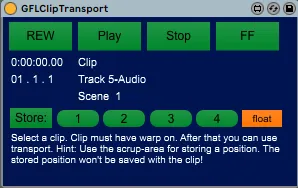
GFLClipTransport
Move this in the master-track and hit float. Select a Cli...
- Type
- Audio Effect
- Author
- gfl
- Version
- 1.0
- License
- None
- Live version
- 10.0.1
- Max version
- 7.3.5
- Downloads
- 187
- Updated
- No Updates
GFLClipTransport is an Audio Effect for Ableton Live by gfl, distributed as freeware, with no license specified by the author. It targets Live 10.0.1 and Max 7.3.5. On maxforlive.com it has 187 downloads. Published 2020-03-15.
New to Max for Live? Read what Audio Effects do, how device licenses work, how to install a device.
Description
Move this in the master-track and hit float.
Select a Clip (clip must have warp on!). After that you can use transport.
To store: click on store and than one of the four buttons right from the store-button.
To recall: click on the number-button where you stored the position. The stored position won't be saved with the clip but with the set.