GranuRise1.2.3.
GranuRise is a sample & synthesis based non-conventional cre...
- Type
- Instrument
- Author
- andrejkobal
- License
- Commercial
- Live version
- 11.0.0
- Max version
- 8.1.1.
- Downloads
- 0
- Updated
- 2022-03-14
GranuRise1.2.3. is an Instrument for Ableton Live by andrejkobal, distributed as a commercial (paid) device. It targets Live 11.0.0 and Max 8.1.1.. First published 2020-03-23, last updated 2022-03-14. 10 user comments below.
New to Max for Live? Read what Instruments do, what the Commercial license means, how to install a device.
Description
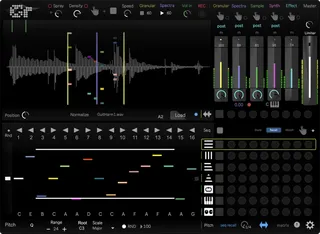
GranuRise is a sample & synthesis based non-conventional creative tool that enables immersive sonic interaction and lets you create complex sound structures intuitively.
GranuRise version v1.2.3 brings native Apple Silicon support. As a result, GranuRise is now much more responsive within the Apple Silicon environment and offers a smooth interaction. Please note that GranuRise is now Universal Binary, so it works on both Apple Silicon and Intel systems.
* Native Apple Silicon support
* Improved responsiveness in Apple Silicon environments, especially in Max For Live.
* Added Multichannel switch on the setting page
Bug fixes
* Mira objects are now correctly displayed on all systems, including Apple Silicon
* The Glitch section inside the Sample module now works correctly
* Few minor Bug fixes and GUI tweaks
Have FUN!
Comments (10)
Bravo!!
When I'm in Live 10 (under the settings button) in the audio section, I only have Audio setup Mixer interpolation as an option. In Max I have the option to record sample, but I bought it for use in as a Max for Live as a plugin. Any ideas? I can't even see a record button on the main GUI in Ableton. I tried emailing from your main site last night, but couldn't find an option to upload a photo.
Thanks,
Arthur
Although the creator of this plugin has been in touch with me and explained that the Max4Live version of this plugin cannot accept incoming audio and only the Max version functions as in the videos, I did not purchase the plugin for Max. I bought it as a plugin for Ableton. This may be a great plugin that can produce amazing sounds, but I'm not interested in using Max alone to make this. I want to use it in Ableton.
Hopefully I can get my refund considering the advertising on this site as a Max4Live plugin and the failures as a Max4Live plugin
As explained, this is a limitation because this is an M4l instrument and not an audio effect. Anyway, you can still record your samples directly into the GranuRise granular buffer.
I have made a tutorial which explains how the recording of live input works in the M4L version. Here is the link https://youtu.be/6nNHSk-mZ_s
Basically, the functionality of the M4L is the same as in the Max version; only the procedure is different.
But as a plus with this system, you get some extra creative options with the Ableton Live Clips (more here https://youtu.be/6nNHSk-mZ_s?t=31).
Hope that helps.
Andrej
Yes, you can drag the samples. There is also a unique way to use Live clips as sample sources for GranuRise and switch them on the fly. See here the example - https://granurise.com/maxforlive-clip-to-granurise/
Another important difference is that GranuRise is this. I'm attaching the text from the readme here: "Ableton Live allocates only 1 CPU core for M4L plugin instances. This means that GranuRise cannot utilize all the available CPU resources of your machine." So currently, the GranuRise performance is better in the Standalone Max version of GranuRise. Hopefully, this will change in the future, and Live will allow more CPU cores for M4L devices. Please note that if you purchase GranuRise, you will get both versions, the standalone and the M4L. Hope that helps.