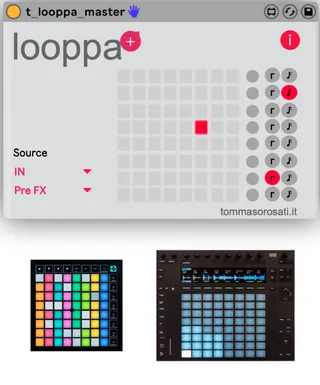
looppa - loop and freeze for Launchpad and Push
2021 update: NOW also WORKS with PUSH2 !! Looppa is a...
- Type
- Instrument
- Author
- tomme
- Version
- 2.0
- License
- None
- Live version
- 10.0.1
- Max version
- 7.3.5
- Downloads
- 0
- Updated
- 2021-05-26
looppa - loop and freeze for Launchpad and Push is an Instrument for Ableton Live by tomme, distributed as freeware, with no license specified by the author. It targets Live 10.0.1 and Max 7.3.5. First published 2020-04-06, last updated 2021-05-26. 10 user comments below.
New to Max for Live? Read what Instruments do, how device licenses work, how to install a device.
Description
2021 update: NOW also WORKS with PUSH2 !!
Looppa is a mlr style looper and freezer in the form of a maxforlive device for ableton live. It allows you to record 8 loops and play them back with a natural system based on the display of the scrolling of the recording and the ability to interact with it.
With Looppa you have the possibility to use a Launchpad or a Push instead of a monome and have it at hand inside Ableton Live. In addition, there are new features such as separate pitch and playback rate management. In addition, you can quantize the recording while always remaining at the master time of your liveset.
Works with: Launchpad, Launchpad S, Launchpad MK2, Launchpad Mini Mk2, Launchpad Mk3, Launchpad Mini Mk3, Push 2
Maybe: Launchpad Pro
Not works with: Launchpad X
VIDEO DEMO: https://youtu.be/p9nNgTH6VZs
VIDEO DEMO with PUSH: https://youtu.be/m9_tG6ptlao
User Manual: https://www.tommasorosati.it/wp-content/uploads/2020/04/looppa_usermanual_new_c.pdf
VIDEO PERFORMANCE1: https://www.instagram.com/p/B2W_x35DbSM/?utm_source=ig_web_copy_link
VIDEO PERFORMANCE2: https://www.instagram.com/p/Bl8fh6JHDqU/?utm_source=ig_web_copy_link
VIDEO PERFORMANCE 3: https://www.youtube.com/watch?v=uB3LEzLV1Rg
VIDEO PERFORMANCE 4: https://youtu.be/WwV7nDDCW6Y
LAUNCHPAD MK2 configuration: https://youtu.be/vYxkJ6Ilqro
LAUNCHPAD MK3 configuration: https://youtu.be/SCoKHE0PYzA
Comments (10)
The 2 manuals (one linked here, one provided with the download) have different sets of instructions and omit explanations for key functions of the device. What is the little "red circle" button? What is the "r" button?
It appears I'm supposed to hit USER on the MK3 Mini then the top-right pad to put your software into "mk3" mode, but doing so has no effect that I can tell.
Also, your youtube videos for the Mk2 and Mk3 configurations are both marked private and no one can watch them.
Can you please, PLEASE make a video with *step by step* setup instructions for Launchpad Mk 3 Mini users?