Thresho
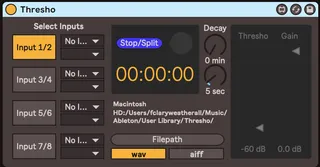
Thresho is a utility that records up to 4 stereo audio input...
- Type
- Audio Effect
- Author
- rossfromfriends
- Version
- 1.0
- License
- None
- Live version
- 10.0.1
- Max version
- 8.1.1
- Downloads
- 317
- Updated
- 2022-05-11
Thresho is an Audio Effect for Ableton Live by rossfromfriends, distributed as freeware, with no license specified by the author. It targets Live 10.0.1 and Max 8.1.1. On maxforlive.com it has 317 downloads. First published 2020-04-17, last updated 2022-05-11. 12 user comments below.
New to Max for Live? Read what Audio Effects do, how device licenses work, how to install a device.
Description
Thresho is a utility that records up to 4 stereo audio inputs automatically based on a user-defined db threshold. Once the audio reaches that threshold, Thresho begins recording; once the audio drops below the threshold, and the ‘decay’ period has been completed, it stops recording.
The timestamped file is then, by default, imported into the user’s ‘User Library’ within ableton’s sidebar for easy access within other projects.
Comments (12)
how do you permanently change the record location, mine keep switching back to the default?
ive tried saving it..
I'm also havin trouble savin the filepatch for the location of the recording, also the initial filepatch doesn't exist on my laptop.
what am i doin wrong? :)
If you read the User_Guide you'll see that he mentions that currently the device does not save the custom location.
@hughchapman
I've never seen that message.
Just a wild guess here: are you using a version of Live that has Max for Live? (either Live standard + Max for Live, or Live Suite). Can you somehow share screenshot with that error message?
Best
@borismaschmeyer
Are you on windows?
The initial filepath is created with the message "mkdir ~/Music/Ableton/User\\ Library/Thresho", that I am afraid might not directly work on windows.
I was about to chime in with an update myself but I can see that @rossfromfriends has already several things in place to try to address the limitations reported. So, it does seem like they have planned working on it. If they don't reply and @borismaschmeyer confirms the path problem is on windows, I can still chime in at least to try to address that.
I realize this is over a year late in answering, but I just fixed my copy so here you go.. You need to update the 'shell' external
1. download the latest version of shell.zip from https://cycling74.com/forums/shell
2. unpack and copy the 'shell.mx*' files from the external folder to `~/Documents/Max 8/Library`
3. Open Thresho.amdx in Max (from Ableton), and replace the shell external (unfreeze, go to edit mode, add the new external from "objects" (click yes on security prompt), and connect it
4. Save the .amdx (if you save it under a new name, such as TreshoM1.amdx, it should work in Ableton right away - if you save over the original, you may need to restart Ableton)
I could share an updated .amdx with the latest `shell` version, but it would be best if the author would do that. Ross?
https://www.dropbox.com/scl/fi/kzbq57n6rds9mypz86ptp/Thresho.amxd?rlkey=oc6lc8q6u739scnxlr0qst9ap&st=1qar5tva&dl=0