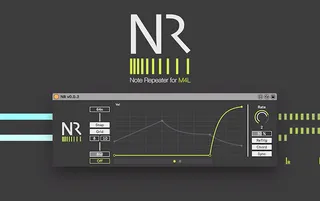
NR - Note Repeater M4L Device
NR is a note repeater (or roller, I can't decide on this) w...
- Type
- MIDI Effect
- Author
- Panosla
- Version
- 0.0.4
- License
- Commercial
- Live version
- 10.1.9
- Max version
- 8.1.1
- Downloads
- 2,491
- Updated
- 2020-04-26
NR - Note Repeater M4L Device is a MIDI Effect for Ableton Live by Panosla, distributed as a commercial (paid) device. It targets Live 10.1.9 and Max 8.1.1. On maxforlive.com it has 2,491 downloads. First published 2020-04-18, last updated 2020-04-26. 7 user comments below.
New to Max for Live? Read what MIDI Effects do, what the Commercial license means, how to install a device.
Description
NR is a note repeater (or roller, I can't decide on this) with a twist. This is a really simple M4L MIDI device, but a surprisingly powerful tool, which can create organic and expressive patterns, with just a few clicks.
Please note that this is a Demo kind of try before buy version. There is a restriction in polyphony (up to 4 instead of 16) and a time limit to use.
See gumroad link for video and more information.
Update 0.0.6
1. Bug fixed - Not repeating the first notes of a clip when it's launched.
2. Push/Push2 support
3. Engine improvements
4. UI Improvements
Comments (7)
I like the UI, with a neon and gray color scheme. I'm trying the demo and have a few questions:
(1) Does the full version have presets?
(2) How do I delete a control point? I expect double-clicking and the same UI conventions as Ableton, but it's not working. I don't see how in the ? help.
(3) Can you add higher note values, even 1024n ? Though it appears I can add grid resolution as well.
(4) It would be nice to have a control to reverse, or mirror the graph. Some roller effects sound very cool when they're symmetrical.
Please let me know at your earliest convenience (I didn't see a contact email elsewhere), and thank you.
https://www.youtube.com/watch?v=lHiSvrnLzMc
Hello Torley, thanks for getting in touch. maxforlive.com doesn't send any notifications for comments and I am not checking it regularly. So, thanks for the understanding :)
In regards to your questions:
1.Unfortunately no. Presets would require to create a file in your system, and after thinking much about it, I ended up that most people (including my self) wouldn't feel comfortable if a device was to create files in my system. The alternative would be to simply save the device as a device preset in live.
2. Deleting a point is something that I didn't mention. I thought people might be already used of this by using shaper, but apparently I am wrong. So my bad on this. It's simple really, hold shift and click on the point you want to delete.
3. No, as far as I know, Live does not support it in the form of this kind of musical interval syntax. If this is true (and I am not mistaken) I would have to implement a custom method, that the tradeoff would be accuracy when rounding the time interval. So, I thought keeping it simple is the best option here.
4. This is indeed a cool feature you are proposing. I am making a note on this, and when I manage to get the time to update the device, I'll do my best to implement it.
I hope that cover's it :).
Let me know if you have any further questions!