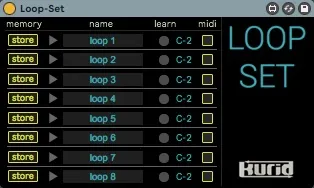
Loop-Set - memory and recall loop setting
Loop-Set is memory / recall device of Ableton Live's loop s...
- Type
- MIDI Effect
- Author
- keikusama
- Version
- 1.0
- License
- Commercial
- Live version
- 10.1.9
- Max version
- 8.1.3
- Downloads
- 0
- Updated
- 2020-04-15
Loop-Set - memory and recall loop setting is a MIDI Effect for Ableton Live by keikusama, distributed as a commercial (paid) device. It targets Live 10.1.9 and Max 8.1.3. Published 2020-04-15.
New to Max for Live? Read what MIDI Effects do, what the Commercial license means, how to install a device.
Description
Loop-Set is memory / recall device of Ableton Live's loop setting.
This is a best device for anyone who plays live with arrangement view.
Turorial video (YouTube) :
https://youtu.be/sCxUjuvf0OQ
How to use :
1) Plug Loop-set.amxd in any MIDI track.
2) Set loop you want.
3) Press "store" button.
4) If you want to memory other loop setting, repeat the process of 2~3.
Recall loop setting :
Only press arrow button.
Recall loop setting with MIDI note :
You check the box "midi", you can recall by displayed MIDI note number.
(When you click"midi"box with pressing [option/alt] key, all slot are checked.)
MIDI learn :
Press this button, and you can set MIDI note Number by incoming MIDI data. Click while holding down the [command / ctrl] key sets the following slots in semitones.
FAQ
Q : What is "name" slot?
A : This is just for notes. You'll write down which songs you're using this setting for.
Q : Can't you memory settings more than eight?
A : Use more Loop-Set on the same track.