- Type
- MIDI Effect
- Author
- johnmfisk
- Version
- 1.1
- License
- AttributionNonCommercialShareAlike
- Live version
- 10.1.9
- Max version
- 8.1.3
- Downloads
- 1,067
- Updated
- 2020-04-21
Drone FX is a MIDI Effect for Ableton Live by johnmfisk, distributed as Creative Commons Attribution-NonCommercial-ShareAlike. It targets Live 10.1.9 and Max 8.1.3. On maxforlive.com it has 1,067 downloads. First published 2020-04-19, last updated 2020-04-21. 4 user comments below.
New to Max for Live? Read what MIDI Effects do, what the AttributionNonCommercialShareAlike license means, how to install a device.
Description
** DESCRIPTION **
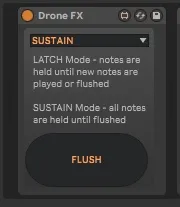
Drone FX - simple Max4Live MIDI Effect device that provides two methods of creating simple drones:
- Latch Mode: note(s) are held until new note(s) are played or the Flush button is pressed
- Sustain Mode: all note(s) are held until the Flush button is pressed
** ATTRIBUTION **
Code for latch mode comes from the wonderful 'simplelatch' device by benniii
Code for sustain mode comes from Cycling '74 Documentation - "MIDI Tutorial 2: MIDI Note Management"
** USAGE **
Easy peasy.. just drop this device in front of an instrument, select 'latch' or 'sustain' mode, and start playing. Click the 'FLUSH' button to clear the notes.
The primary intent for this device is to help with creation of drones and/or provide a sustain pedal-like effect without having to use a physical pedal.
** SUGGESTIONS **
Play around with the two modes - 'latch' allows you to play new notes without having them stacked up on the previous notes, while 'sustain' lets you slowly build up fairly huge sounds - at the risk of sounding muddy. A little experimentation will let you hear the differences.
The simple controls in this device are all mappable in Live:
- Device Activator Button - map to a "Toggle" type MIDI control
- Flush Button - map to a "Momentary" type MIDI control
- Mode Selector - can be mapped to a dial or slider type MIDI control
The 'FLUSH' button sends a Note Off message, which stops all notes immediately - this can be quite abrupt. If you need to smoothly fade notes out, consider adding your favorite reverb device after the instrument and dial in the effect that you want.
** VERSION HISTORY:
v. 1.1
- added code to catch a 'device off' event so that the MIDI note buffer can be gracefully cleared (sending all pending Note Off messages) if the user specifically clicks on the Device Activator button to turn this off
- tidied up the code a bit and added a couple comments
- Watched the Max For Live video on Best Practices and realized that I had forgotten to Freeze and Lock the device before uploading it :-0
v. 1.0
- initial release into the wild
Good luck & enjoy making music!
Comments (4)