MIDIdifferentTWO
Old-school step sequencer for 'map' control of parameters....
- Type
- MIDI Effect
- Author
- synthesizerwriter
- Version
- 0.07
- License
- None
- Live version
- 10.1.7
- Max version
- 8.1.0
- Downloads
- 717
- Updated
- 2020-05-10
MIDIdifferentTWO is a MIDI Effect for Ableton Live by synthesizerwriter, distributed as freeware, with no license specified by the author. It targets Live 10.1.7 and Max 8.1.0. On maxforlive.com it has 717 downloads. First published 2020-04-14, last updated 2020-05-10. 2 user comments below.
New to Max for Live? Read what MIDI Effects do, how device licenses work, how to install a device.
Description
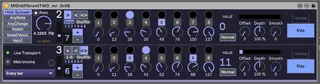
Old-school step sequencer for 'map' control of parameters. The rotary controls are intended to be controlled via Ableton's 'remote control' mapping - from a set of MIDI Controller sliders, for example.
Inspired by Johan Wallen's question on Max For Live Users group on FB recently...
Two channels... The top channel's 'Not Synced' menu option uses the free-running oscillator with the Rate rotary control, or the other menu options allow Note On messages, Note changes, and various other MIDI messages from the MIDI clip to advance the counter (so any sync is entirely under your control!). The lower channel always syncs to Live's clock (the red/green dot indicates if Live's transport is running (green=running), and you can choose timing values from 'Every Quarter Beat' to Every 8th Bar'.
New additions in V0.03 include direction controls (forwards, backwards, and back'n'forth), plus sequence length (from 1 to 8 steps - yes, one step!).
New additions n v0.04 include shuffling of the order in which the steps are output (the 'Shuffle' button), skipping of steps (click on the Square step number and it will show an 'X' - the step will no longer be output), plus the '1-8' button resets the output steps to the normal state and ordering. The 'Skip' square number buttons are also mappable, so you could control them from a MIDI Controller...
Version 0.05 tidies up some internal naming (Skips instead of Loads) and implements a better 'blink' algorithm.
Version 0.06 fixes the indicator lights (you probably didn't notice it!) and does some further internal tidying up.
Version 0.07 should fix the 'Undo History' problem (I overlooked one of the consequences of changing the indicator lights!), and should give a more useful range on the 'Smooth rotary control (it is now exponential, rather than linear).
Most importantly, the rotary controls (and Step skips) can be used as map targets for Ableton's 'remote control' 'control voltage' system - just take the Map button on an LFO, or the Learn from a MIDI controller, and click on the rotary controls or the 'Skip' square grey buttons (under the step lights) - for these then a multiple slider device like the Novation Launch Control XL would be a very good choice!
When you have the sequence steps controlled, then you can use the 'Map' buttons to control parameters in other devices!
Having separate 'asynchronous' synced and unsynced 8 step parameter-controlling sequencers in one device is the sort of thing you might expect to find in a modular synthesizer, not a DAW!
More information on this device can be found in my blog: http://blog.synthesizerwriter.com/2020/04/different-two-dual-channel-old-school.html
Programmed very quickly! Don't expect too much! Would anyone like an extenson to 9 steps?
Comments (2)