Track To Clip Renamer
Note - Draft version of this patch contains bugs. Dev...
- Type
- MIDI Effect
- Author
- sharp
- Version
- 1.0
- License
- None
- Live version
- 10.0.1
- Max version
- 7.3.5
- Downloads
- 600
- Updated
- 2020-04-18
Track To Clip Renamer is a MIDI Effect for Ableton Live by sharp, distributed as freeware, with no license specified by the author. It targets Live 10.0.1 and Max 7.3.5. On maxforlive.com it has 600 downloads. Published 2020-04-18.
New to Max for Live? Read what MIDI Effects do, how device licenses work, how to install a device.
Description
Note - Draft version of this patch contains bugs.
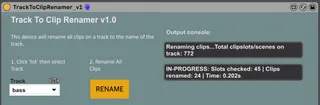
Device to rename all clips on a track to the name of the track. Useful for managing large live sets. Might be a useful learning tool for learning using javascript in max for live too.
v1 | 18 Apr 2020
Instructions:
1. Save your session (there is no undo)
2. Rename track in session view as normal (this is what will be copied to all clips on that track
3. Select a track using the drop down
4. Click RENAME to rename all clips.
5. WAIT, it may take 10-20 seconds (it renames 50 clips per second on average)
Known bugs:
1. Slow and inefficient.
2. The first two times you click "RENAME" it doesn't rename all the clips, it stops mid way through. The third time seems to work and renames all the clips.
Right click device 'Show Max Window' to see error messages, or check the output console to see how many clips were renamed.
sharp | 18 Apr 2020