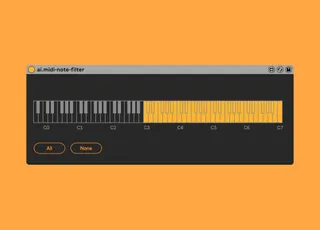
ai.midi-note-gate
The device allows to filter midi notes by pitch. You can use...
- Type
- MIDI Effect
- Author
- anthonyivol
- Version
- 0.2
- License
- None
- Live version
- 10.1.13
- Max version
- 8.1.3
- Downloads
- 1,055
- Updated
- 2021-04-02
ai.midi-note-gate is a MIDI Effect for Ableton Live by anthonyivol, distributed as freeware, with no license specified by the author. It targets Live 10.1.13 and Max 8.1.3. On maxforlive.com it has 1,055 downloads. First published 2020-05-12, last updated 2021-04-02. 6 user comments below.
New to Max for Live? Read what MIDI Effects do, how device licenses work, how to install a device.
Description
The device allows to filter midi notes by pitch. You can use it for exemple to use different part of a keyboard in different tracks.
0.2 Fix the undo issue.
Comments (6)
This happens when I play a clip with this device in it's rack. (Ableton 11)
I've been investigating the issue and it seems that there are only 4 live.objects in the patch:
All and None buttons, and kslider objects x2 (visible and invisible one).
The kslider objects have Parameter Visibility set to "Stored Only".
I have set the All and None buttons Parameter Visibility to "Hidden".
Thanks for this device, and any help by resolving this issue would be great.
It's a very nice implementation of a general note filter but unfortunately not useable for me in this state.
I set "kslider" to "Stored Only" , the other 3 parameters to "Hidden".