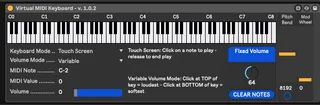
Virtual MIDI Keyboard
Virtual MIDI Keyboard is a simple M4L device that provides a...
- Type
- MIDI Effect
- Author
- johnmfisk
- Version
- 1.0.2
- License
- AttributionNonCommercialShareAlike
- Live version
- 10.1.14
- Max version
- 8.1.4
- Downloads
- 1,580
- Updated
- 2020-06-06
Virtual MIDI Keyboard is a MIDI Effect for Ableton Live by johnmfisk, distributed as Creative Commons Attribution-NonCommercial-ShareAlike. It targets Live 10.1.14 and Max 8.1.4. On maxforlive.com it has 1,580 downloads. First published 2020-06-04, last updated 2020-06-06. 2 user comments below.
New to Max for Live? Read what MIDI Effects do, what the AttributionNonCommercialShareAlike license means, how to install a device.
Description
Virtual MIDI Keyboard is a simple M4L device that provides a full 96-key keyboard (C0-C8) - the device is based on the utilitarian but hard working _kslider_ Max object
** FEATURES
The keyboard offers 4 keyboard input modes and 2 volume modes:
Input Modes:
- Monophonic (sustain) - all notes are held (sustained) and the current note is highlighted
- Polyphonic (sustain) - all notes are held (sustained) and all notes are highlighted
- Touch Screen - notes are played with mouse-down click and released on mouse-up
- Touch Screen (latch) - notes are played on mouse click and remain held (sustained) until the next note is played
Volume Modes:
- Variable - the loudness (velocity) of a note depends on where the user clicks on the keyboard key - TOP of the key = the loudest, BOTTOM of the key = softest
- Fixed Volume - all notes are played at the same loudness (velocity)
The virtual keyboard also responds to regular MIDI note-in events - notes played on an external MIDI keyboard or controller are shown on the virtual keyboard.
The virtual keyboard also provides both Pitch Bend and Mod Wheel functions, which are linked to external MIDI keyboard or controller input.
** USAGE:
Totally trivial - drop this in front of any VSTi instrument on a MIDI track that lacks its own virtual keyboard and play away...
** COMMENTS:
As the name suggests, this is a very simple device that really doesn't do more than let you enter notes without needing an external MIDI keyboard or controller. I'm aware that Ableton Live has a "Computer MIDI Keyboard" option - I'm just not a huge fan of it, which is why I made this little device.
** VERSION HISTORY:
- 1.0
Initial release
- 1.0.1
Added Pitch Bend and Mod Wheel
- 1.0.2
Swapped out 2-bit (0-127) pitch bend for high-resolution (14-bit) Pitch Bend
** FEEDBACK:
As always, if you find a bug or have an idea for improvement, please let me know.
Enjoy making music!
- John
Comments (2)
that way when you are playing your computer keyboard you can visually see where you are at and do some basic functions like octave+/- and pitch bend. Abelton has no visual keyboard like this so this device is really handy when you only have your laptop and want to know where you are at on the keyboard. Thank you so much for this awesome M4L device!