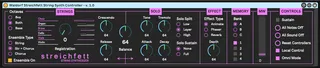
Waldorf Streichfett String Synthesizer Controller
This provides near full remote control of the fun and slight...
- Type
- MIDI Effect
- Author
- johnmfisk
- Version
- 1.0
- License
- AttributionNonCommercialShareAlike
- Live version
- 10.1.14
- Max version
- 8.1.4
- Downloads
- 393
- Updated
- 2020-06-07
Waldorf Streichfett String Synthesizer Controller is a MIDI Effect for Ableton Live by johnmfisk, distributed as Creative Commons Attribution-NonCommercial-ShareAlike. It targets Live 10.1.14 and Max 8.1.4. On maxforlive.com it has 393 downloads. Published 2020-06-07.
New to Max for Live? Read what MIDI Effects do, what the AttributionNonCommercialShareAlike license means, how to install a device.
Description
This provides near full remote control of the fun and slightly retro Waldorf Streichfett String Synthesizer.
** DESCRIPTION
This M4L device provides almost complete control over the streichfett string synth with continuous, two-way communication so that changes in the hardware controller are immediately reflected in the device controls. Essentially all controls are under MIDI control with the interesting (and inscrutable) exception of Volume.
Go figure...
Anyway, the only other feature that is not covered is sysex dump functions - personally, I don't really have a need for that so it didn't make it onto the feature list. If you do need or want that, there's a really polished looking, commercial-grade M4L app by nukemodular that is hosted on Gumroad:
https://gumroad.com/l/LlBHn
Alternatively, do a search for "streichfett" on Max4Live to see what other developers have been up to.
** USAGE
Easy peasy... install this with all your other M4L Midi Effects and drop it on a MIDI Track.
** CRITICAL **
Don't forget to configure the hardware in Live! Otherwise, you'll be wondering why nothing is happening. This is pretty simple actually:
- Open up the Preferences dialog and click on the "Link/MIDI" tab - now, make sure that under "MIDI Ports" both Input and Output stanzas are present for "Streichfett" and that you've turned on both "Track" and "Remote"
- Now, go back to the MIDI Track where you've loaded the device and make sure to select "Streichfett" from the "MIDI To" drop down menu: if you don't do this, no messages will be sent to the hardware
I've copied and pasted the informational blurbs from the Waldorf User Manual into the Info View hints - they are fairly comprehensive, but if you're planning to spend much of any time with this fun little synth, it will behoove you to spend the 10-15 minutes it takes to skim over the actual documentation.
Also, keep in mind that the synth does NOT provide sound-over-MIDI - if you want to record sound into Live, you'll need to connect the rear 1/4" audio outs to an appropriate audio interface that is correctly configured in Live.
** VERSION HISTORY
- 1.0
Initial release
** FEEDBACK
As always, please let me know if you find a bug or have an idea or suggestion for improvement.
Enjoy making music!
- John