- Type
- MIDI Effect
- Author
- GastonKilo
- Version
- 1.1.1
- License
- AttributionNonCommercialNoDerivatives
- Live version
- 10.0.1
- Max version
- 7.3.5
- Downloads
- 2,298
- Updated
- 2020-06-08
Step Input is a MIDI Effect for Ableton Live by GastonKilo, distributed as Creative Commons Attribution-NonCommercial-NoDerivatives. It targets Live 10.0.1 and Max 7.3.5. On maxforlive.com it has 2,298 downloads. First published 2020-06-02, last updated 2020-06-08. 16 user comments below.
New to Max for Live? Read what MIDI Effects do, what the AttributionNonCommercialNoDerivatives license means, how to install a device.
Description
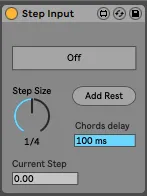
Step Input allows you to create midi notes of a defined size, step by step.
1. Create a midi clip
2. arm Step Input
3. play notes that will be added step by step to your midi clip.
A little bit more handy than the step input of live (using arrows key).
You can also add chords and change step length on the fly.
[NEW] You can now add rests of the step size :)
Comments (16)
you can do a temp fix by inputting a low-velocity note, and then using a Velocity midi device after it to filter out low velocities.
Sorry I didn’t had the notifications!
By rest do you mean inclue a space between the next note?
If yes, that’s my plan for the next version!
Just added the rest capability :)
GastonKilo, this is absolutely incredible, and now everything is mappable and automatable!
Thanks for listening to our suggestions!
I stopped typing for a second to go back and check it because I saw the Current step value. Unfortunately, this cant be controlled so it moves automatically but I have NO control over where it starts from.
I have to switch the device off for the current step to be reset. It then goes back to zero. Furthermore, the device can be on step 20 or 17 and the clip is only 4 steps (4 1/4 notes) long.
I appreciate the efforts of all creators. So thank you for trying to solve a problem for us because Ableton refuse to implement basic functions.
However, in its current state/ my current understanding of how it works.
It isn't practically usable for me.
Live 11
Didn't look at this for a while. Not sure when I'll have the time but will try it
LEt me specify:
I set to "On" and then play a note on the keyboard, and nothing gets recorded in the empty midi clip and the button turns back to "off"
Such a great device but with 2 massive bugs. I'm using ableton suite 12.1.10
Thanks for creating