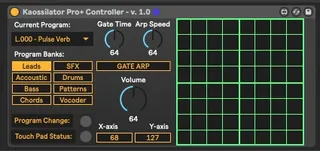
Kaossilator Pro-Plus Controller
Control and play a Korg Kaossilator Pro+ from within Ableton...
- Type
- MIDI Effect
- Author
- johnmfisk
- Version
- 1.0
- License
- AttributionNonCommercialShareAlike
- Live version
- 10.1.14
- Max version
- 8.1.4
- Downloads
- 557
- Updated
- 2020-06-03
Kaossilator Pro-Plus Controller is a MIDI Effect for Ableton Live by johnmfisk, distributed as Creative Commons Attribution-NonCommercial-ShareAlike. It targets Live 10.1.14 and Max 8.1.4. On maxforlive.com it has 557 downloads. Published 2020-06-03. 7 user comments below.
New to Max for Live? Read what MIDI Effects do, what the AttributionNonCommercialShareAlike license means, how to install a device.
Description
Control and play a Korg Kaossilator Pro+ from within Ableton Live.
** DESCRIPTION
The Korg Kaossilator Pro+ is a "dynamic phrase synthesizer / loop recorder" designed primarily for live DJ performance. However, it can be used with Ableton Live with certain limitations as described below.
** FEATURES
The Kaossilator Pro+ Controller device can control a subset of hardware parameters (those exposed for MIDI control):
- Touch pad - note on/off
- Touch pad - x-axis movement (note scale played)
- Touch pad - y-axis movement (note modulation or effect)
- Program and Bank selection
- Program volume
- Gate Arp button on/off
- Gate Arp - arp speed
- Gate Arp - gate time
This Max for Live device maintains continuous, two-way communication with the Kaossilator device - changes made in the hardware are immediately displayed in the M4L device and vice versa.
** LIMITATIONS
Several important features can ONLY be configured using the hardware device itself - this includes Tap Tempo, Note Range (key and scale), Loop Recording, SD Card configuration, etc.
** KAOSSILATOR PRO+ CONFIGURATION IN LIVE
The basic procedure is:
- connect the device to your computer or laptop using the appropriate USB cable
- in Live, open up the Preferences dialog, go to "Link MIDI", and in the "Control Surface" section select "MackieControl" - you should then be able to select the Kaossilator Pro device from the drop down list
- if you want to record sound from Kaossilator in Live, you'll need to use an Audio Interface device connected to the RCA Audio outputs on the back of the Kaossilator device and correctly configured in Live
- alternatively, you can monitor sound using headphones plugged into the Phone jack on the front of the Kaossilator device
** USAGE
Seriously easy:
- install the M4L device file wherever you'd like and Live can find it
- create a new MIDI Track in Live
- double click on the device in the Live file listing or drag and drop it onto the MIDI track
- MAKE SURE that the Track's "MIDI To" is set to your Kaossilator MIDI device - in my computer, this comes up as "MackieControl Output (KAOSSILATOR PRO+ (SOUND))"
- to play sound, mouse click on the touch pad grid once to start play and a second time to stop - move the mouse around the grid to change note and modulation
- there are 250 programs ("patches") available in the Kaossilator Pro - these are organized into 8 banks, which can be selected using the Bank buttons - then select the specific program from the drop down menu
** FEEDBACK
Please let me know if you find a bug or have a suggestion for improvement.
Enjoy making music!
- John
Comments (7)
Good luck!
John
I try to do as you wrote but without any success... No sound is coming from Kaossilator controlled by the "first" track via MIDI.
I tried to set it up like this:
Track #1: it's a MIDI clip, output MIDI to: Track #2 - Kaossilator Track
Track #2: it's a track with Kaossilator device, output MIDI to: MackieControl Output (ch1) as yours, Input MIDI: All ins or directly from Track #1
Unfortunately this does not work for me. It's quite a simple setup and I checked different possibilities.
I can see that there is some MIDI signal coming into the device as MIDI icons are flashing accordingly to what comes in but the Kaossilator Device is always silent, however I can still play with mouse.
Is there any option to use Kaoss as an input source with your device?
I figured out how to use Kaoss as input using Mackie INPUT - On Kaoss I need to press "Shift + 8:" it turns Kaoss to a different mode: Ext Ctrl
I think I need to contact with you directly so maybe you can help me with my issues.
Is there a way to share your "device" code? I mean I would like to look at it and figure out what's the problem. Could you share the "source code"? Something tells me that as a software developer I will finish probably with my own implementation :) It always works as I wish ;)
Best regards
PK
Sorry to hear that you're having trouble getting this going - as you mentioned, it's a pretty simple set up. I'm not sure why this isn't working.
The hardware set up that I have used for this is:
- Kaossilator > USB > Computer
- Kaossilator > RCA (rear jacks) > Focusrite Scarlett 2i2 > Computer
Obviously, both the Kaossilator and Scarlett need to be configured in Ableton.
I don't know if that is any help, but that set up has worked well for me.
And as far as sharing code, the great news is: you already have it! What you need to do is open up in Max for Live. To do this, load the device, then click on the "device" icon (it looks vaguely like a transistor) at the top of the device window and that should open Max. You'll need to unfreeze the device and then open it for editing, but that exposes everything.
There's very little real programming involved, as you'll see -- it's mostly wiring control outputs to hardware inputs. Pretty simple. The Kaossilator Pro + documentation lists all of the CC commands that it will respond to.
Please feel free to mess around with it - if you find anything that needs correction, please let me know and I'll try to take care of it and upload a new device file. If you want to mod it and release it, feel free! All I would ask is simple attribution.
Good luck and let me know how things go.
J
If memory serves me correctly, you shouldn't have too much trouble adapting this to the KP3. You'll need the documentation for the device - most importantly, the CC numbers and ranges, which should be readily available. Korg is really good about that.
Programming in M4L really isn't terribly difficult, but if you're just starting out, I'd suggest (a) watching a couple YouTube videos and (b) tearing apart a few M4L devices. Stick to simple ones - the ones that come stock with Ableton Live (assuming you have the studio version with Max4Live as part of the suite). There are some simple "demo" versions of devices in the M4L folder that I found really helpful when I was just getting started.
Hope this helps!
Good luck,
John
Is there a way to program the XY pad on the plugin where we choose the squares to be played in the numbered sequence we want so that it automatically plays the squares in the numbered sequence of choice so that we dont have to use the mousse every time to play the sounds? Also if then we can trigger this sequence to play at certain intervals of our choice?
Also in a previous message u wrote that we can use a midi signal from one track to play the pro+ controller v.1.0 by using the output in the midi signal track to the kaoss pro + track. I tried doing this but got no trigger or sounds. I get sounds just from the track with the pro+ controller but the midi track doesnt trigger the sounds automatically. What am i doing wrong?