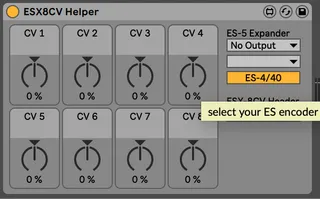
ESX8CV Helper
This utility requires Expert Sleepers ES-5 and ESX-8CV expan...
- Type
- MIDI Effect
- Author
- bhenry1790
- Version
- 1.1
- License
- None
- Live version
- 10.0.1
- Max version
- 7.3.5
- Downloads
- 279
- Updated
- 2024-06-28
ESX8CV Helper is a MIDI Effect for Ableton Live by bhenry1790, distributed as freeware, with no license specified by the author. It targets Live 10.0.1 and Max 7.3.5. On maxforlive.com it has 279 downloads. First published 2020-06-27, last updated 2024-06-28. 5 user comments below.
New to Max for Live? Read what MIDI Effects do, how device licenses work, how to install a device.
Description
This utility requires Expert Sleepers ES-5 and ESX-8CV expanders
8 knobs driving 8 outputs of the ESX-8CV. I like to map the MIDI LFO / Envelope to the knobs and let it rip!
Set the ES-5 Expander Ext. Out to the stereo pair of your ES-5, then set the ESX-8CV Header to the one connected to the EXS-8CV.
Enjoy!
Updated to work with Push Banks
You'll need to add the es*encoder~ externals to Max for these to work.
https://www.expert-sleepers.co.uk/downloads.html
On a Mac the location for externals (windows will be similar):
Users/Shared/Max 8/Library/
If using with an ES8/9 as an aggregate device turn off DRIFT CORRECTION
Apple Silicon Version:
https://maxforlive.com/library/device.php?id=10549
Comments (5)
well here goes,
ive just bought an ES-8 , ES-5 AND ESX-8CV
there all connected up, id like to know, how are the max external encoders added to the m4l tools, as there missing
--- and which of the 16 outs 1/2 to 15/16 are used for the ES-5 from the ES-8 8-)
You'll need to be sure the Expert Sleepers M4L Externals are installed so MAX/MSP can access them.
Download the Externals Here:
https://www.expert-sleepers.co.uk/downloads.html
Place the externals in folders accessed by MAX:
https://www.reddit.com/r/MaxMSP/comments/g8dzur/installing_externals_and_help_files_in_max_8/
I don't have an ES-8 so check your documentation for the correct stereo pair to use for the ES-5 (on es-9 it's 7/8). All of the expander outputs will run on this stereo pair. For example you'll pick 7/8 audio outs and header 1 for the ESX8GT(and ES5) devices. 7/8 header 2 for ESX8CV Devices. Let me know if this works, or if you need further assistance.
Really awesome stuff! Using your tools a lot!
I have a question and a feature request about/for the cv instrument hack. I like that you made a version that directly communicates with the 8cv expander. The thing I wanna ask is that I am rarely using more than 2 envelopes and so there is 4 outputs left and I would love to use my 8cv expander to play two voices in my rack. Could you make another version that directly communicate with the expander but outputs are assignable? This way people can decide how many and which outputs they wanna use for each instrument.
Thanks a lot
Using native CV Tools (CV Instrument) you send the "CV" to Tracks in Live. Then with ESX8CV TRACK HELPER choose the Ableton Tracks you want for each output. This method allows the greatest flexibility assigning different devices to each output in an ESX8CV