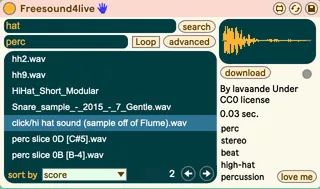
Freesound4live
Browse, search, listen and download sounds from Freesound.or...
- Type
- Audio Effect
- Author
- aylesim
- Version
- 2.0
- License
- None
- Live version
- 10.0.1
- Max version
- 8.1.4
- Downloads
- 0
- Updated
- 2020-08-02
Freesound4live is an Audio Effect for Ableton Live by aylesim, distributed as freeware, with no license specified by the author. It targets Live 10.0.1 and Max 8.1.4. First published 2020-07-22, last updated 2020-08-02. 22 user comments below.
New to Max for Live? Read what Audio Effects do, how device licenses work, how to install a device.
Description
Browse, search, listen and download sounds from Freesound.org without leaving Ableton Live.
Video demonstration : https://www.youtube.com/watch?v=6SrgBE_nJJM&feature=youtu.be
Comments (22)
Great idea.
When I "click here" nothing happens.
I already have a Freesound account.
Thanks
It doesn't open a browser.
But when I type anything into the registration box, the GUI opens, and I can click on the "love me" then the donate button, then web browser opens.
I've contacted freesound.org, maybe they can issue an authorization code.
Now it wont open the gui until you provide a valid code.
Also, if nothing shows up when you click on "click here" it's because Max and Ableton can't access to the internet.
1. I need to reauthorize every time I open the device.
2. If I open the device on a large project the device won't accept the authorization code
3. The download button isnt downloading sounds
It does not remember the Freesound authorization code.
Some sounds will not download (maybe a Freesound issue?) I can duplicate this if you wish.
Maybe the downloaded sounds could go in a separate folder instead of the Freesound4Live folder.
I hit your PayPal box, this is a nice bit of work!
I don't mind paying for small projects like this, but it sucks that nobody is replying to all the comments reporting issues. At this stage I would like a refund, please advise...
I would buy it, but after reading the comments, I think I'll wait. Hope the issues are resolved soon so I can buy it!
https://freesound.org/docs/api/overview.html
Bill.
Bought it and had to reinstall computer a week later :(
Could I get a re-download link?
Thanks.
Please make sure both Ableton and Max have full access to the internet.
Place the original folder somewhere in your computer and add this folder to the Live sidebar, then drag the instrument in Live from there.
If you have any issue pm me on [email protected] ✨