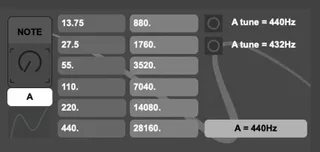
Note Frequency
This utility device shows the note frequency for the desired...
- Type
- MIDI Effect
- Author
- AbletonExpert
- Version
- 1.0
- License
- Commercial
- Live version
- 10.1.18
- Max version
- 8.1.3
- Downloads
- 0
- Updated
- No Updates
Note Frequency is a MIDI Effect for Ableton Live by AbletonExpert, distributed as a commercial (paid) device. It targets Live 10.1.18 and Max 8.1.3. Published 2020-08-18.
New to Max for Live? Read what MIDI Effects do, what the Commercial license means, how to install a device.
Description
This utility device shows the note frequency for the desired note.
You can either Type in the note name or use the knob to select the note. Click on the note knob and then type in the note name. (A A# B C C# D D# E F F# G G#)
You can type in # following any note to get the sharp note.
You will have the option to choose between 440Hz standard tuning or 432Hz.