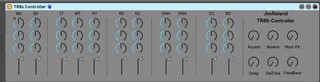
Roland TR8S Max For Live device
Hi This midi device allows for total control of all the T...
- Type
- MIDI Effect
- Author
- JimRoland
- Version
- 1.1
- License
- None
- Live version
- 10.15.1
- Max version
- 8.1.5
- Downloads
- 1,067
- Updated
- 2020-08-24
Roland TR8S Max For Live device is a MIDI Effect for Ableton Live by JimRoland, distributed as freeware, with no license specified by the author. It targets Live 10.15.1 and Max 8.1.5. On maxforlive.com it has 1,067 downloads. First published 2020-08-20, last updated 2020-08-24. 7 user comments below.
New to Max for Live? Read what MIDI Effects do, how device licenses work, how to install a device.
Description
Hi
This midi device allows for total control of all the TR8S main Parameters from within Live. Furthermore all of the device controls are mapped and available to your Midi Device such as Push, Push 2 or in my Case the Novation SL MK3. This means you don't have to switch machines to record automation tweaks of effect etc.
This device will also work with any device that is capable of auto map and your device should instantly map for automation or Live tweaks on the fly.
If you wish to speak to me about this device contact me on [email protected]
I hope you enjoy using the device.
I have updated the file to correct a mistake in the naming of the DECAY parameter. I had mistakenly named the 11 voices as DEL instead of DEC.
Updated to 1.1 - The device was not passing Midi (many thanks to Chris for the tips) it should now work passing midi thru as expected.
Any more issues please let me know. Many thanks for your patience.
Comments (7)
However, the problem I'm having is that MIDI doesn't seem to be properly passing through the device. I'm getting no MIDI signal indication to the right of the device.
Oh, and snare drum names should all be SD, instead of one SD and the other three SN.
I'll pass this comment on to your email as well. Thanks.
I'm hoping someone else can comment and see if we can solve this issue.
The device I made uses a new object for M4L called Live.banks.
This object allows any of the parameters to be available to the rotary knobs of my Novation SL Mk3 in Banks of eight when my SL Mk3 is in "Incontrol" mode.
The theory (I believe) is the same for any other midi controller that is capable of utilisng the live.banks object that I'm told is new in Live 10. So it should work with any of the Novation devices that have automap and should work fine with Push etc.
Just out of interest, which version of Live are you running?
Jamie
I believe that I have fixed this now and have uploaded ver 1.1 which now works for me.
Please let me know if it now works as you would expect.
Thanks for your patience, this is my first ever device.
Jamie
I use the device in Automap mode so there is no setup required.
However if you want to map the drum machine to it directly you need to activate the midi map mode in Ableton.
The theory then is simple
1. Move a knob/slider on the device and then move a knob/slider on the TR8S next and they will then be mapped.
2. Reoeat step one for each knob/slider.
3. Save your project so you don't have to repeat this each time you load up.
If you are still struggling I will make a video and upload it to youtube to explain in more depth. Please let me know
Jamie
I've just tried it. Couple of things to note.
Midi map mode is the MIDI button top right of Ableton.
Make sure you have "Track" enabled in Preferences/Midi of Ableton for the TR8s otherwise Ableton won't map it.
Jamie