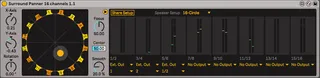
Surround Panner 24 channels
Loving the Surround Panner but feeling it just can't get su...
- Type
- Audio Effect
- Author
- Sanders
- Version
- 1.2.3
- License
- None
- Live version
- 12.1
- Max version
- 8.6.5
- Downloads
- 0
- Updated
- 2025-05-19
Surround Panner 24 channels is an Audio Effect for Ableton Live by Sanders, distributed as freeware, with no license specified by the author. It targets Live 12.1 and Max 8.6.5. First published 2020-09-10, last updated 2025-05-19. 11 user comments below.
New to Max for Live? Read what Audio Effects do, how device licenses work, how to install a device.
Description
Loving the Surround Panner but feeling it just can't get surround enough? With a bit of effort I managed to adapt this super elegant device (all credit to the official m4l team) to turn the surround-ness up to 24, with an added floating window if you want to get into the nitty-gritty. All the other functionality stays exactly the same. Enjoy the 360º goodness!
Update 1.1:
- added an option for 10, 12 & 14 speaker set-ups
- minor UI fix
Update (24 ch.):
- speaker set-ups go up to 24 channels now
- added a mappable floating window for precise control
Bugfix (24 ch.) 1.2.1:
- fixed bug that caused conflict when automating movement, forcing you to have to re-enable automation every time.
Bugfix ( 24 ch.) 1.2.2- 16-10-2024:
- fixed bug that caused x & y axis to not recall when not automated. The full state of the device should now load correctly, as saved, on opening of the liveset.
Bugfix ( 24 ch.) 1.2.3- 22-03-2025:
- fixed bug that caused the output type of output 3/4 to change when a type for output 11/12 was selected.
REDOWNLOAD TO THIS VERSION IF YOU DOWNLOADED BEFORE 22-03-2025!
Comments (11)
should be noted it jumps to 16 channels, so there is no option for 10, 12 or 14 channel.
I dont know if this is possible as Ableton seems to treat all tracks as stereo even when they are mono.
If this were possible it could greatly speed up exporting, and transfering to different DAWS, or if one were using the panner in alternative ways.
Thanks!
Had another look at the internals, and seems that the m4l audio routing protocol is hardwired to route in stereo pairs. Your best bet is to simply route audio to a audio/return track with monitoring set to 'in', and pull its audio into 2 separate audio channels with a utility filtering out L or R respectively.
If you then only record the 'end' channels with the utility on them, that would allow for quick exporting after the initial set-up.
Has anyone perhaps found a way to export the movement between the speakers as well?
best
henry
You’d have to route the outputs of the panner to some audio channels, arm those and press record, that should do it.
Greets,
Sander