- Type
- Audio Effect
- Author
- CharlyBeck
- Version
- 0.7
- License
- AttributionNonCommercialShareAlike
- Live version
- 10.1.17
- Max version
- 8.1.3
- Downloads
- 448
- Updated
- 2020-09-15
SubCut is an Audio Effect for Ableton Live by CharlyBeck, distributed as Creative Commons Attribution-NonCommercial-ShareAlike. It targets Live 10.1.17 and Max 8.1.3. On maxforlive.com it has 448 downloads. First published 2020-09-14, last updated 2020-09-15.
New to Max for Live? Read what Audio Effects do, what the AttributionNonCommercialShareAlike license means, how to install a device.
Description
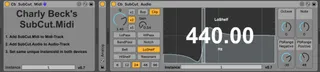
This pair of midi/audio device allows you to lo-cut the sub frequencies of a bass-audiotrack on the cutoff represented by a played midi note.
The cutoff is automated according to the played midi note.
The devices are intended to be used to replace the subbass with pure sine wave for example.
Usage:
1. Add SubCut.Midi device to Midi-Track.
2. Add SubCut.Audio device to Audio-Track.
3. Set same unique InstanceId in both devices.
4. Play notes to set cutoff frequency of SubCut.Audio-device.
Version-History:
v0.7: Increased Bitch-Bend-Range to +/- 10 Octaves.
v0.6: Added Clip-Option
v0.6: Added Pseudo-Adaptive Q
v0.6: Fixed Q-Change Bug
v0.6: Added Q-Factor Button
v0.5: Added BitchBend-Support
v0.5: Added missing high notes to frequency table
v0.4: Fixed FilterType-Label
v0.3: Added Q control
v0.3: Added Gain control
v0.3: Added FilterType control
v0.2: Fixed NoteToFrequencyConversion
v0.1: Initial revision