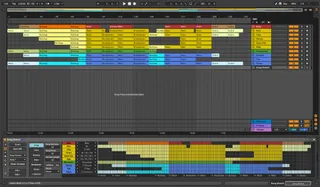
Song Sketch
Use Song Sketch to quickly create a draft arrangement from y...
- Type
- Audio Effect
- Author
- XYStudioTools
- Version
- 2.1
- License
- Commercial
- Live version
- 11.2.6
- Max version
- 8.3.1
- Downloads
- 0
- Updated
- 2022-11-15
Song Sketch is an Audio Effect for Ableton Live by XYStudioTools, distributed as a commercial (paid) device. It targets Live 11.2.6 and Max 8.3.1. First published 2020-09-12, last updated 2022-11-15. 6 user comments below.
New to Max for Live? Read what Audio Effects do, what the Commercial license means, how to install a device.
Description
Use Song Sketch to quickly create a draft arrangement from your loop in the Session View. Song Sketch is a pattern based arrangement tool that lets you create, edit and save arrangement templates that can be applied to your clips in the Session View, instantly creating an arrangement in the Arrangement View.
Song Sketch 2 comes with a core library of 172 arrangement templates in 14 different styles: Hip Hop, House, Deep House, Techno, Dance & Mainstage, Pop, Drum & Bass, Trap, Reggae & Dancehall, Trance, Reggaeton, Downtempo, Disco and Rock & Country. Add-on templates are also available.
What's new in Song Sketch 2:
- Grouped tracks: Assign a group of tracks in the Live set to one part in the arrangement template.
- More parts: Include up to 32 parts in an arrangement.
- Improved scene workflow: Easier to work with several different scenes in the arrangements.
- Import arrangements from Live: Import existing Live sets into Song Sketch (in Live 11).
- Increased flexibility: More settings for editing the song and the song sections.
- Device view: Use the device directly in the "device view" in addition to the pop out window.
- More templates: A total of 168 templates in 14 genres included and more templates available as add-ons.
Demo: https://youtu.be/MaUVYRD_hq8
Release Notes: https://docs.google.com/document/d/17vfMoT57v05-fbF-UWqpK6m5uu35z8QDX95kewefPa8
Comments (6)
Thanks Markus for all your hard work on this. Incredible tool.