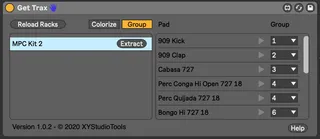
Get Trax
Use Get Trax to auto split your Drum Rack to separate tracks...
- Type
- Audio Effect
- Author
- XYStudioTools
- Version
- 1.1.3
- License
- Commercial
- Live version
- 11.2
- Max version
- 8.3.1
- Downloads
- 0
- Updated
- 2022-10-06
Get Trax is an Audio Effect for Ableton Live by XYStudioTools, distributed as a commercial (paid) device. It targets Live 11.2 and Max 8.3.1. First published 2020-09-10, last updated 2022-10-06. 6 user comments below.
New to Max for Live? Read what Audio Effects do, what the Commercial license means, how to install a device.
Description
Use Get Trax to auto split your Drum Rack to separate tracks with separate midi clips, with one click. The device identifies which sounds are being used in a Drum Rack, helps you to group them and creates separate tracks for each of the samples/groups. Your new tracks will also take the names of the drum pads/samples, and midi clips are prepared with the corresponding notes. The intended use case is for anyone that prefers to have separate tracks over using the built in audio tracks in a rack, for example to be able to arrange your drums with separate midi clips.
The difference from using Ableton's Extract Chains function is that while it extracts chains to one track at a time, giving the new track the same name as the original track, this device can extract all pads that you have used with one click and gives you track names based on each sample. When you click extract in the device, you will get everything extracted, without having to locate the pads you actually use, repeat the extract chain function, or manually rename tracks.
Tip: If you have any processing on the drumkit, like a drum bus - remove it before separating the rack. Then you instead group the separated tracks and put your processing on the group.
Performance info: Even though the separation gives you multiple drum racks for the individual sounds, this does not affect CPU usage. CPU usage on drum racks is related to the number of chains, not the number of racks.
Works with Live 10 and 11.
Available for free.
Comments (6)
I'm getting all kinds of warnings in Live 11. Might want to test it out in the beta.
- Fully compatible with Live 10 & 11
- Option to delete or mute is implemented
When I try it just seems to duplicate the track (and all the samples & midi notes).
Or maybe I'm missing something in the process!