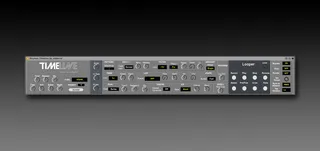
Strymon TimeLine Multidmensional Delay Editor
A Max4Live editor for the Strymon Time Line reverb pedal - e...
- Type
- MIDI Effect
- Author
- midierror
- Version
- 1.0
- License
- AttributionNonCommercialNoDerivatives
- Live version
- 10.1.18
- Max version
- 8.1.5
- Downloads
- 1
- Updated
- 2020-10-07
Strymon TimeLine Multidmensional Delay Editor is a MIDI Effect for Ableton Live by midierror, distributed as Creative Commons Attribution-NonCommercial-NoDerivatives. It targets Live 10.1.18 and Max 8.1.5. On maxforlive.com it has 1 downloads. First published 2020-10-06, last updated 2020-10-07. 4 user comments below.
New to Max for Live? Read what MIDI Effects do, what the AttributionNonCommercialNoDerivatives license means, how to install a device.
Description
A Max4Live editor for the Strymon Time Line reverb pedal - enabling control of all the parameters and storage of their automation within Ableton Live 10.
Included in the download are:
Install Guide
Manual
2 Max4Live AMXD Files
Switch between the Digital, Dual, Pattern, Reverse, Ice, Duck, Swell, Trem, Filter, Lo-fi, dTape and dBucket effects by simply clicking the effect title!
You can change and automate preset changes using the Preset number.
Choose between TWO versions of the editor, with a plain Ableton skin and a snazzy metallic textured version.
Send all of the gui parameters to the TimeLine enabling you to load and save patches in your set, and ensure the gui and pedal have corresponding values.
Once purchased you can contact me any time using the built in Support button, with questions, ideas and suggestions.
If you have any questions about the software, it's functionality or usage please contact me BEFORE purchase, as I do not offer refunds on software downloads.
Required software: Ableton Live 10 Suite
Required Hardware: Strymon TimeLine
Please note: This is not a patch librarian, it will transmit parameter changes to the TimeLine but the software does not load and save patches. However, you may save sounds on the TimeLine, as described in the manual.
This product is in no way affiliated with or endorsed by Strymon.
Comments (4)
I am looking at buying this and the big sky editor.
Do all of the parameters show up on Ableton Push 2?
Kind Regards