- Type
- MIDI Effect
- Author
- aixtrafly
- Version
- 1.1
- License
- AttributionNonCommercialShareAlike
- Live version
- 10.1.25
- Max version
- 8.1.3
- Downloads
- 516
- Updated
- 2020-12-15
ChordTrigger is a MIDI Effect for Ableton Live by aixtrafly, distributed as Creative Commons Attribution-NonCommercial-ShareAlike. It targets Live 10.1.25 and Max 8.1.3. On maxforlive.com it has 516 downloads. First published 2020-10-12, last updated 2020-12-15. 2 user comments below.
New to Max for Live? Read what MIDI Effects do, what the AttributionNonCommercialShareAlike license means, how to install a device.
Description
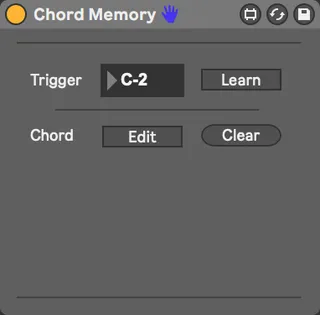
With this device you can assign any chord to any trigger key you want. Let's say you want to save an E major 7 chord to the Key C2 of your MIDI Keyboard, then simply click the learn button, play the trigger key, in this case C2, then click on the edit toggle to enter the edit mode. In edit mode, playing a note once assigns the note to the trigger key. Playing the note again removes the note from the trigger key. Hence to play an E major 7 chord, you have to play the notes E, G#, B and D#. Click the edit toggle again to save the chord and leave the edit mode. Now every time you hit C2 on your MIDI keyboard the E major 7 chord is played.
Feedback, bug reports and feature requests are very welcome.
P.S.: This is my very first max device, so the "code" might not be best practice.
1.1 UPDATE:
- Bug fix
Comments (2)