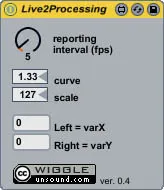
Live 2 Processing
Sends numerical audio peak data to Processing via OSC. Any p...
- Type
- Audio Effect
- Author
- wiggle
- Version
- 0.4
- License
- AttributionNonCommercial
- Live version
- 8.1
- Downloads
- 2,078
- Updated
- 2009-12-05
Live 2 Processing is an Audio Effect for Ableton Live by wiggle, distributed as Creative Commons Attribution-NonCommercial. It targets Live 8.1. On maxforlive.com it has 2,078 downloads. First published 2009-11-10, last updated 2009-12-05. 2 user comments below.
New to Max for Live? Read what Audio Effects do, what the AttributionNonCommercial license means, how to install a device.
Description
Sends numerical audio peak data to Processing via OSC. Any program that can tap into OSC can use the data (Super Collider, etc.)
Reporting Interval = will wait 1-60 frames per second before sending next data.
Curve = define the data curve (linear, log, etc.)
Scale = define the max value for data.
The data from the left channel is labeled with varX.
The data from the right channel is labeled with varY.
You will need the OSCp5 library:
http://www.sojamo.de/libraries/oscP5/
If you have any suggestions, please comment below!
Below is the code for Processing:
------------------------------------------------
//"Live 2 Processing" Sample Code
//Taps into OSC to receive audio peak data from Live.
//Use in conjunction with Live 2 Processing (Max4Live plugin)
//by WIGGLE (www.unsound.com)
//Plugin available at: http://www.unsound.com/M4L/
//You will need the OSCp5 library: http://www.sojamo.de/libraries/oscP5/
//and controlP5 library: http://www.sojamo.de/libraries/controlP5/
//thanks: Ableton, Ash Oakenfold, Andreas Schlegel, and Casey Reas
import controlP5.*;
import oscP5.*;
import netP5.*;
ControlP5 controlP5;
Slider xSlider;
Slider ySlider;
OscP5 oscP5;
NetAddress myRemoteLocation;
int varY = round(32 / 8.0f);
int varX = round(32 / 8.0f);
void setup()
{
size(180, 150);
createSliders();
initOsc();
}
void initOsc()
{
oscP5 = new OscP5(this,8080);
myRemoteLocation = new NetAddress("127.0.0.1",8080);
oscP5.plug(this,"onX","/varX");
oscP5.plug(this, "onY", "/varY");
}
void createSliders()
{
controlP5 = new ControlP5(this);
xSlider = controlP5.addSlider("varX",
0, // min
127, // max
32, // default value
20, // x
55, // y
100, // width
10); // height
ySlider = controlP5.addSlider("varY", 0, 127, 32, 20, 75, 100, 10);
}
void draw()
{
background(0x000000);
fill(128);
rect(10, 45, 160, 50);
}
void onX(int value)
{
xSlider.setValue(value);
}
void onY(int value)
{
ySlider.setValue(value);
}
------------------------------------------------
Comments (2)