- Type
- Audio Effect
- Author
- Efraim
- Version
- 1.2
- License
- AttributionShareAlike
- Live version
- 10.1.43
- Max version
- 8.6.3
- Downloads
- 4,061
- Updated
- 2024-07-02
CPfade is an Audio Effect for Ableton Live by Efraim, distributed as Creative Commons Attribution-ShareAlike. It targets Live 10.1.43 and Max 8.6.3. On maxforlive.com it has 4,061 downloads. First published 2009-11-28, last updated 2024-07-02. 17 user comments below.
New to Max for Live? Read what Audio Effects do, what the AttributionShareAlike license means, how to install a device.
Description
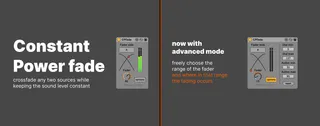
CPfade is a constant power fader.
This will let you seamlessly crossfade between any two sources using one control, whether it be inside an effect rack or across multiple channels.
Linear crossfading causes the loudness to dip in the middle of the fade, "constant power" fading retains constant power and thus perceived loudness.
The A/B switch inverts the fader control.
For crossfades, add a CPfade set to A to one source and a CPfade set to B to the other. Map the fader dial of both instances to one control (physical knob or macro control) to begin crossfading.
To crossfade between more than two sources: add a CPfade instance for each fading movement that needs to happen. So if a sound should fade in and out, it needs two CPfade instances. For example, if there are three sounds 1 2 and 3, there will be one instance on sound 1 (set to fade out between 0 and 63), two instances on sound 2 (one set to fade in between 0 and 63, the other set to fade out between 64 and 127) and one instance on sound 3 (set to fade in between 64 and 127).
Changelog:
1.2:
- Added options to define the range of the dial and to choose where in that range the fading occurs.
1.1:
- Improved fading interpolation to reduce/eliminate glitches with fast fades.
1.0:
- Polished the graphics,
- Added immediate update of fader value after A/B switch.
0.9:
- Initial release.
Comments (17)
Regards
Maybe at some point I will make a youtube video demonstrating this little tool.
so in doing bass note sine tests, i noticed that the overall volume gets louder in the center... which parameter can be tweaked to adjust the curves of the fade?
also what would you recommend to getting rid of the glitches when fading quickly... maybe a line object?
thanks again for a useful little thang...
You need two tracks and put a CPfade on each of them, then on one track set it to A and on the other on B.
Assign one knob to both of the CPfade instances and use that to crossfade between the tracks.
Of course if you only have one track it will just fade out.
You could also do it with an audio rack, where you have two chains, each with a CPfade object.
@ offthesky:
I have tested it too with bass notes, and I found out that with some notes the volume drops in the middle, while with others it rises. So it must be a phase problem, causing a slight null or a peak in the middle.
I don't know how this can be solved yet, because I noticed that Max isn't 100% accurate with timing when running inside Live.
Maybe I'll add customisable fader curves in a future version. That is a little bit more complicated as it means there needs to be a kind of interpolation between different formulas. Right now it's based on a sine-function.
The glitches were caused by the line-object not working at audio-rate. I've made an update that fixes this (basically I replaced the [line 0.] with [line~ 0.]).
You need two tracks and put a CPfade on each of them, then on one track set it to A and on the other on B.
Assign one knob to both of the CPfade instances and use that to crossfade between the tracks.
Of course if you only have one track it will just fade out.
You could also do it with an audio rack, where you have two chains, each with a CPfade object.
@ offthesky:
I have tested it too with bass notes, and I found out that with some notes the volume drops in the middle, while with others it rises. So it must be a phase problem, causing a slight null or a peak in the middle.
I don't know how this can be solved yet, because I noticed that Max isn't 100% accurate with timing when running inside Live.
Maybe I'll add customisable fader curves in a future version. That is a little bit more complicated as it means there needs to be a kind of interpolation between different formulas. Right now it's based on a sine-function.
The glitches were caused by the line-object not working at audio-rate. I've made an update that fixes this (basically I replaced the [line 0.] with [line~ 0.]).
(I haven't confirmed that the file does. Latest version is 13 years old. But you should be able to edit and troubleshoot, if needed)
Is there a way to use multiple pairs of it in a project? For example, "Pair 1: A/B", "Pair 2: A/B", etc. Each pair is independent and does not affect the others.