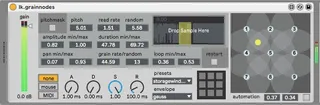
lk.grainnodes
Mac OSX only. Save 9 presets of granular synth parameters an...
- Type
- Instrument
- Author
- lewiskeller
- Version
- 1.1
- License
- AttributionNonCommercialShareAlike
- Live version
- 10.1.30
- Max version
- 8.1.8
- Downloads
- 856
- Updated
- 2021-03-07
lk.grainnodes is an Instrument for Ableton Live by lewiskeller, distributed as Creative Commons Attribution-NonCommercial-ShareAlike. It targets Live 10.1.30 and Max 8.1.8. On maxforlive.com it has 856 downloads. First published 2020-11-18, last updated 2021-03-07. 5 user comments below.
New to Max for Live? Read what Instruments do, what the AttributionNonCommercialShareAlike license means, how to install a device.
Description
Mac OSX only. Save 9 presets of granular synth parameters and interpolate between them using a 2D node space. Makes it possible to manipulate many parameters simultaneously using simple intuitive mouse gestures. Comes with a glitchy sample and 9 presets loaded, so after installing just click in the node space to start making crazy sounds right away!
*** update mar 7, 2021 - v.1.1: presets are now stored with the live set without having to save or load a .json file. you will still be prompted to save the .json before quitting the set but it's not necessary. however doing so will allow you to reuse the presets in other sets or swap different presets in the same set.
Comments (5)
-Lewis
buffer~ - non: can't open
Setup is more than capable, 2600x, 32gb ram@3200,
Could actually be that I'm on Win :(
rom1constant