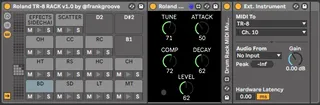
Roland TR-8 RACK v1.0 Push by frankgroove
I created this Ableton Live Drum Rack because I needed a sim...
- Type
- Instrument
- Author
- frankgroove
- Version
- 1.0
- License
- Attribution
- Live version
- 10.1.30
- Max version
- 8.1.7
- Downloads
- 0
- Updated
- 2020-12-29
Roland TR-8 RACK v1.0 Push by frankgroove is an Instrument for Ableton Live by frankgroove, distributed as Creative Commons Attribution. It targets Live 10.1.30 and Max 8.1.7. Published 2020-12-29. 1 user comment below.
New to Max for Live? Read what Instruments do, what the Attribution license means, how to install a device.
Description
I created this Ableton Live Drum Rack because I needed a simple solution to compose, jam and perform live with the Roland TR-8 using Ableton Push. This is the perfect solution to sequence and tweak the drum sounds comfortably.
One limitation I encountered down the road: The mute and solo functions of Ableton are Audio centric, that means that midi data is still transmitted during mutes; if your synth or sound source is not routed back to Ableton via audio interface you can still hear the instrument. To solve this problem I integrated Drum Rack MIDI Mute and Solo by regularjack https://maxforlive.com/library/ device/6679/drum-rack-midi-mute-and-solo in the chain, this solution works like a charm.
Use case scenario: Bunch of external instruments connected to an analog mixer Ableton as a sequencer only. (that’s mine)
Installation:
Unzip the downloaded file, open the folder containing the included files. Open your Ableton User Library on a new window, the default path is:
Windows: \Users\[username]\Documents\Ableton\User Library
Mac: Macintosh HD/Users/[username]/Music/Ableton/User Library
Drag and drop Roland TR-8 RACK v1.0 by @frankgroove.adg into /Presets/Instruments/Drum Rack/ Drag and drop the Max MIDI Effect folder into /Presets/MIDI Effects/
*** You can also copy the individual files as you see fit or even on your preferred folder structure if you know how to solve file dependency issues inside Ableton.
Usage:
You will find the drum rack on your user library - presets - instruments - drum rack inside Ableton, just drag it to a new midi track.
Routing:
Highlight a pad on the drum rack, change the corresponding midi device, channel and audio return, you must repeat the steps for every pad. Once you finished the routing process you can click on the save preset button, that way you can recall this exact setup from the user library every time.
Contact:
instagram: @frankgroove
Comments (1)
Some news however: I've tested Drum Racks in Live 11 and they (at least according to my testing) have been updated so that MIDI is also muted and this also fixes the problem with the internal sends and returns in drum racks.
Whether in Live 11 this also fixes the issue when working with external gear like the TR-808 I don't know, but I'd assume so.
Just thought I'd share!