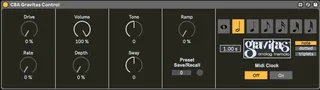
Chase Bliss Gravitas Control
I took some ideas from jehrich's "Max Bliss" collection a...
- Type
- MIDI Effect
- Author
- bagnolessa
- Version
- 1.0
- License
- Attribution
- Live version
- 10.1.30
- Max version
- 8.1.8
- Downloads
- 157
- Updated
- 2021-04-23
Chase Bliss Gravitas Control is a MIDI Effect for Ableton Live by bagnolessa, distributed as Creative Commons Attribution. It targets Live 10.1.30 and Max 8.1.8. On maxforlive.com it has 157 downloads. First published 2020-11-30, last updated 2021-04-23. 2 user comments below.
New to Max for Live? Read what MIDI Effects do, what the Attribution license means, how to install a device.
Description
I took some ideas from jehrich's "Max Bliss" collection and added new functionalities and a new design.
Beyond the normal implementations that can be easily deduced from Gravitas's midi manual, the great advantage that this device brings is the possibility to choose a Live's tempo-based tremolo rate, spanning from the whole note to the sixty-fourth note, including dotted and triplets.
A small note for its correct functioning:
- The pedal must be categorically on Midi clock OFF. I have left the option to set it to On, but this prevents the possibility of spacing over all the time divisions, since the midi clock "blocks" the pedal on its internal divisions.
Comments (2)
I'm using 2 chase bliss pedals and I've got the MIDIbox connected to my laptop. I don't have a problem when using them individually with these patches, but when I try to use more than 1 pedal plugged in at a time, they both respond to the same MIDI CCs.
I\m trying to get your device to send its' output on a different MIDI channel, so that I can have each pedal on its' own discreet channel, but no matter what I do, they always send their MIDI over channel 1!
Any idea how I might achieve this? Or how are you operating more than 1 chase bliss pedal?
Thanks!
It's pretty simple, you can find the way to do it in every midi manual from CB pedal.
I quote from the manual: "every pedal is set to MIDI channel 2 by default, but it is easy to change if you need to. If you want to change it, simply hold down both stomp switches when you provide power to the pedal (hold down both stomp switches simultaneously, provide power and then you can let go). The pedal is now looking for the first “Program Change” message it sees, and
it will set itself to whatever channel it gets that first message from, permanently (until you change it again, of course)."
Hope it helps.