MDD BarryTron
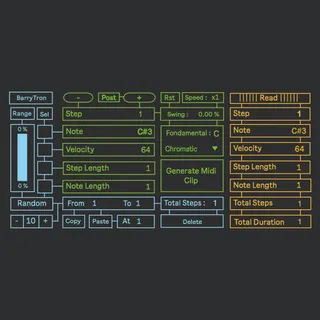
BarryTron is a Step by Step Sequencer inspired by the great ...
- Type
- MIDI Effect
- Author
- maximedangles
- Version
- 1.0
- License
- Commercial
- Live version
- 10.1.18
- Max version
- 8.1.5
- Downloads
- 0
- Updated
- 2023-03-20
MDD BarryTron is a MIDI Effect for Ableton Live by maximedangles, distributed as a commercial (paid) device. It targets Live 10.1.18 and Max 8.1.5. First published 2020-12-08, last updated 2023-03-20. 12 user comments below.
New to Max for Live? Read what MIDI Effects do, what the Commercial license means, how to install a device.
Description
BarryTron is a Step by Step Sequencer inspired by the great Orthogonal Device ER101.
- Add and Edit Step one by one
- Each Step has its owns Parameters : Notes, Velocity, Step Length and Note Length.
- Random, Math and Delete Functions for each Parameters
- Copy/Paste Function
- Global Speed
- Swing
- Tranpose with notes from C4 to B4
- Scales from Push + User Scale mode
- Generate your sequence in MIDI Clip directly on Ableton.
- Great Push implementation
BarryTron in action with Push : https://www.youtube.com/watch?v=TwkEsnsEufI
Thanks to Antoine, Baptiste, Camille, and Thilbault for your Feedback.
Thank you Brian for your inspiration.
And thank you for your support by buying it ! Don't forget to have Fun :)
Comments (12)
is there a js element to this mfl device? I'd like to buy it and mod it for myself, but my js skills are terrible...
cheers
... I *am* sorry for what I am about to do to your work, heh
great device !
just want to know how to create a silence note please?
best
Je viens d'acheter le sequenceur et je rencontre quelques problèmes de compréhension.
L'implémentation push 2 n'est pas complète comme sur la vidéo. J'ai les fonctions du haut mais pas les fonctions bouton "copier, etc...". Je suis sur Live 11, c'est peut-être la raison ?
J'ai l'impression que les boutons delete ne delete rien...
J'ai aussi généré des clips midi qui ne sonnaient pas exactement comme l'original (il manquait une note par ex).
Tu peux m'apporter un peu d'aide ?
Merci pour ton travail !