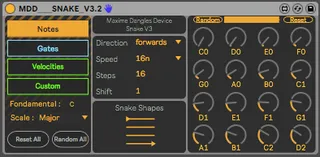
- Type
- MIDI Effect
- Author
- maximedangles
- Version
- 3.2.3
- License
- AttributionNonCommercial
- Live version
- 10.1.25
- Max version
- 8.1.3
- Downloads
- 96,676
- Updated
- 2020-11-26
MDD SnAkE is a MIDI Effect for Ableton Live by maximedangles, distributed as Creative Commons Attribution-NonCommercial. It targets Live 10.1.25 and Max 8.1.3. On maxforlive.com it has 96,676 downloads. First published 2018-06-02, last updated 2020-11-26. 65 user comments below.
New to Max for Live? Read what MIDI Effects do, what the AttributionNonCommercial license means, how to install a device.
Description
Hello !
3.2.3
- some fine tuning...
3.2.2 (27.10.2020) :
- Add the possibility to change the root in midi with C4 to B4.
- added two custom parameters.
- Correct a bug in case of multiple use of snake in user mode. it caused ableton crash.
- Snake Shapes are now midi mapable
3.2 (2020 update) :
- PUSH ready
- New quantisation, with PUSH scales + a user one
- Better view of the notes
- Swing Added (in the top of gates view)
- Better initialiation
- Shapes menu have been replaced by a Dial
- All sequencers can be randomised by sending a C2
- Notes sequencer can be randomised by sending a D2
Thanks ELPHNT for this great tutorial (with the V3, the patch have been updated since the video) :
https://www.youtube.com/watch?v=v2_mdrz9XrU
have fun ;)
maxime
Comments (65)
The design is gorgeous, Max. Great job!
Do you have paypal ? I will gladly give you some $$
Also would be nice to be able to switch between notes (c c# d..) and values in the notes step seq
Is it still possible to do some snapshot of settings with this version ?
this is by far my favourite m4l device of all times!
- Do you think it is possible to select/enter notes/gates via Push2-pads and encoders?
- It would be endlessly cool to set the quantizer notes via midi keyboard.
Please consider adding 'Swing' to it's already impeccable feature set.
"Shift" case is not working for me on Ableton Live 10.1.4.
I can't change the number, I can work only with "1".
Would be really nice if you could add some modulation input as the original Rene.
If you need a beta tester, would be a pleasure for me ;-)
For some reason it doesn't output a signal for me? Does anyone else have the same problem?
Thank you all for all your great words... I can't beleve there's so much download for this patch now. thanks again ELPHNT for the highlite !
I'll try to answer some questions :
- For some reason it doesn't output a signal for me? Does anyone else have the same problem?
It's normal to have nothing at the begin, because there's no gate and velocities are at zero. i can change that in the next version.
- Is there a way to change the length of the gate steps, in order to play notes of different lengths?
I'm sorry it's not possible directly into the snake. but you can do it with that trick : add a "note lengh" midi effect after the snake and map the custom parameter to the note lenght ;)
- One little question is only to use for live sets or will I also be able to record the sequence?
You can record your midi snake sequence by routing it to an another midi track. (this can help : https://www.youtube.com/watch?v=2iVLDxzsnAQ)
- I can't change the number, I can work only with "1".
It depend how many step you have in your sequence. with 16 steps, "shift" doesn't have any effect... please let me know !
speak soon
maxime
Message for me... hahaha
SnAkE have been update from here to 3.2 :)
@lukebrown, SWING have been added, i hope you will enjoy it !
Concerning the Note Lengh, it doesn't work well with this GUI, i mean i don't know how i can add it, with an understanding point of view for everybody.
It's a complex sequencer but really easy to use, and i really want to keep it like that.
I need more time, or ideas if you have some !
Just wanted to send a heads up that when I hit the C2 or D2 notes on the PUSH, it's triggering the Random All function. Not sure why or how but it might be a bug? It might also be that I'm not using it correctly! :)
Regardless, thanks for sharing!
- All sequencers can be randomised by sending a C2
- Notes sequencer can be randomised by sending a D2
i didn't think about that before, but :
It can be something bad if you play in user scale with midi note in activated...
maybe will add a switch for that in a next update...
Maybe I'm missing something but I'm unable to right click on the 'Snake Shapes' to find the Show Automation/Modulation option. I was trying to map it to a Macro Control but seems impossible, anyone else facing this?
Be nice to have a second ( or third ) set of customisable parameters to assign, but apart from that this rocks.
So good ;)
@theabletonguru : i just did an update for that, sorry i forgot it !
@Borez : thank you for your nice words man, all credit goes to makenoise for having this great idea and inspiration.
For the second or third custom, it's easly possible to make it. i just would like to keep it easy to understand.But you're not the first one who asking me this. so maybe i'll add more one soon ;)
First of all: Thanks for building this!!! I can't stress this enough! Total game changer for our productions! :)
Feature request:
So when using the randomization feature on notes you can only define the random range with the slider which is very tedious when you are working with a drum rack that has only 16 sounds on 16 pads. Most of the time the random generated note sequences play some of the notes above or below the 16 drum pads and I couldn't find any other m4l or live midi effect to restrict the notes to exactly one octave for example...
I think it would be an awesome addition to the device if you could enter a specific note range in which the randomization takes place. For example C2 to C3. It shouldn't be too complicated to add what do you think?
Thanks for the terrific work so far!
Jan
@janritter, yes that's a cool idea !
i'll try do it in a next update ;)
It would be great if you could implement a "shift sequence" function where you are able to shift the whole sequence by f.e. a 16th note. I often get cool melodies/rhythms with the snake but sometimes they just not sit right to the kick. I then sample the midi output from snake and shift the midi notes manually.
For jamming and finding the right pattern it would be a big help if you could rotate the whole pattern in snake itself as exporting the midi to a new miditrack always takes time and interrupts the flow (and sometimes recording the midi to another miditrack doesn't work so count this as a bug report as well 😜).
Which brings me to another request: being able to drag sequences from snake and drop them directly into a midi channel would be huge 😳
Thanks for your time and glad the you liked my last suggestion!
Thank you so much for this M4L device! It's so fun to use and it gives me such cool and useful results. Amazing work!
I tried to donate with gumroad using paypal but the link wasn't working, you should contact gumroad.
Cheers my friend!
Hi! there's one feature that has disappeared after the last patch. I could modulate note knobs with custom parameters but now it's not possible. How can I modulate notes with custom now?
Snake is such an inspiring tool for improvisation... Thanks a lot for this !
I was wondering (request :) ): Do you think that's possible to enter directly (type in) the range amount to get instant results with midi mapping ? eg. I have a four sample bank in my eurorack sampler and I want to randomly trig only the four corresponding notes... At the moment it's quiet difficult to select a precise range just by clicking on the line...
Anyway, keep up the good work !!
Thanks a lot again !
I have one question with the new version. I am not able to open the Snake Shape menu like on the old version. I see that it is now midi mappable but how can I just open the pop-up menu like in the old version?
Thanks again for this great work.
Thank again for an amazing device!
C'est un bel objet, merci pour cet apport !
Mais pourquoi ne pas avoir intégré de ternaire dans le speed ?
Ableton needs this device!
Some reports in 3.2.3:
1) Push2 maps "shift" param-encoder not with absolute value (1-16) but with percentage 1-100-
2) Push2, sections custom2 and custom 3 are not accessible
3) with push2 would be REALLY USEFUL access to upper "random bar" to limit random values ranges
5) Push2 maps foundamentals with numbers not with scale name
First of all this is an amazing sequencer I use this all the time, so thanks for making this avaliable.
One issue I am having at the moment with it in scence view is once I stop it playing it keeps going?
Is there something I am missing or do I have a glitch?
Any assistance would be greatly appreciated
Cheers
Firstly a fantastic device. Seriously good !
Just a question... I'm having an issue like some of the other Users above ... I cannot find the dropdown menu for the Snake Shapes that was apparent in ELEPHANTS video.
I tried this in both Live 10 and 11, and the arrow to the right of the Snake Shapes doesn't exist. Just wanted to know if this function was taken off or is it an issue our end? Thanks in advance. Keep up the great work!
cheers
Talka
click+hold Snake Shapes and scroll down+up
What am I doing wrong?
HELP!!
But I second the request to have the ability to "rotate" patterns so that they start on a different step. I assumed that's what shift did but I guess that's something else. What does shift do then?
Am i doing something wrong? Can anyone help
thank you
Could someone help me?
Thanks
live.text: can't find multimap-unmap.svg
Can this be fixed?
Thanks for your time in advance!
https://forms.gle/VVPHqm6Aoz6bVZVk9
First of all, thank you for the inspiring sequencer. I noticed something today when I entered the Scale F Minor. I have the grade D available there. If I'm not mistaken, that's not right. Otherwise it's just fun.
Thanks again and regards
I have noticed the same as the last post above. The 'minor' scale does not seem correct to me. If you set to A minor you get a sharp note on the 6th.
Cheers
I have one feature suggestion that shouldn't be too difficult to implement should you agree it's a good idea.
In the 'Gates' section could pressing 'Reset' do the opposite of what it does now, which means it clears all gates and leave silence? That would be incredible for live performances! So what I mean is you can decide whether 'Reset' fills out all gates or removes all gates.
That's the simple way to do it. The sick way of doing it is if you could save a reset state. That means you've got you're notes, gates, velocities and custom parameters set the way you like it - then you can improvise by changing all of them, and then by hitting reset all you can go back to the saved state. Think of the crazy live performance possibilities that would open up.
Again, thank you for your amazing work.
Best, -Esben
1) Velocity is not currently working for me while syncing my Eurorack with Max for Live. Do you have any suggestions? I am using version V2.2.3a.
2) Would it be possible to develop a new mod to expand tunings, micro-tonal tunings, for example?
Thanks again for your work.
Best,
Simon
thank you!