CF SYSEX Recorder
This device stores sysex data that can be sent automatically...
- Type
- MIDI Effect
- Author
- chapelierfou
- Version
- 1.0
- License
- None
- Live version
- 10.1.18
- Max version
- 8.1.5
- Downloads
- 1,205
- Updated
- No Updates
CF SYSEX Recorder is a MIDI Effect for Ableton Live by chapelierfou, distributed as freeware, with no license specified by the author. It targets Live 10.1.18 and Max 8.1.5. On maxforlive.com it has 1,205 downloads. Published 2021-02-19. 22 user comments below.
New to Max for Live? Read what MIDI Effects do, how device licenses work, how to install a device.
Description
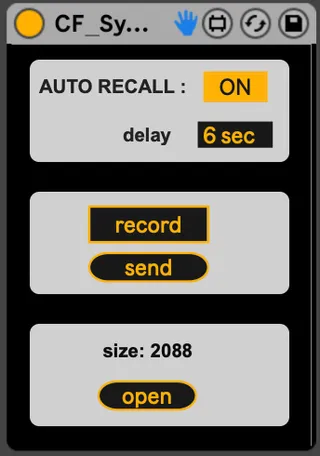
This device stores sysex data that can be sent automatically when the live set is loaded.
HOW TO USE :
- drop in a MIDI track
- set up midi input and outputs connected to your synth
- hit record
- send the patch from the synth
- if you want the sysex to be sent back when you load the live set, switch AUTO RECALL to ON. You can additionally delay the sending (can be useful if you plan to send several patches, which can overload the synth).
- "open" lets you read the sysex messages.
Comments (22)
Gonna try it out today.
Could you enhance the "open" field to also enable pasting sysex into it (so one doesn't have to record)?
Background: I use knobkraft as a librarian, and could then just copy/paste from there into your M4l device, without the need for recabling /rerouting
I'm looking for a different solution, is ti possible to create a device that play in arrangement when a note or a cc trigger it's state?
I'm trying to create some MIDI tracks, with a clip that plays a SYSEX in order to transpose my Yamaha MODX. In fact I really know the bytes to be sent, but Ableton is not able to sent in a MIDI Track.
In my session I'm working with 8 scenes, which is, each row, a song, and each song has a transpose (sysex to be sent when I play that scene).
actually you can copy, paste, edit the content. But it must respect this syntax :
"sysex" : [value, value, value.....]
The main problem might be that the device expects decimal values, but your sysex files are likely to be hexadecimal.
It should be easy to modify. I could simply make the "send" button automatable. It would trigger the sysex when the parameter goes from low to high.
Would it be ok for you ?
I opened a feature request for knobkraft to be able to show the actual sysex , but good point
Also w re to automatable button: I think that would work.
What might be worth thinking about is triggerable event based lists of sysex to circumvent ableton missing sysex capability to handle real-time sysex automation (i have a Mks-80, no cc, only sysex).
Can you "record" sysex in a m4l device with song timestamps?
Thank you again for your work, much appreciated!!
have you simply tried to open the sysex files with a text editor ?
I could make a device that hosts a list of messages with customizable ways to trigger them. But I'm thinking that maybe what you'd need would be a proper editor for you MKS-80, don't you ?
My device was made with in mind the goal to save patches within the live set.
I just made a quick search and found this : https://www.youtube.com/watch?v=ogr6EcmIJtY
maybe worth the 6,90€ don't you think ?
"the device expects decimal values, but your sysex files are likely to be hexadecimal."
How much trouble would it be to alter the max4live device so it expects the sysex values in Hexidecimal and not decimal?
SysEx messages are natively transmitted and received in hexidecimal so this might help make this more usable that way unless I'm missing something.
It's more or less just how it's displayed, and how it's been copy/paste.
The aim of the device was to send a patch from the synth, record it, and play it back to the synth when the liveset is loaded.
Would you need to use sysex files that are already there on your computer ? In this case, I would load them to the synth, send them to the device, record them. To copy/paste them, you'd need to translate them into decimal first. Which is easily doable in Max by adding "0x" before a decimal number, so it's possible to add it to the patch somehow.
I was looking for ways to add to it so I could put in my own logic including a dump request message.. I'm a bit new to using max for live. (although I've used Max and things like PD and supercollider for some time)
you say "adding 0x before a decimal number" - i believe you mean hex, correct? So if I wanted to give it hex values I would just enter them like in C++... 0xF0, 0x2E, 0x11, 0x00, 0x00, 0x7F, 0xF7
Or message me ? (Oops, there is no private message system here in maxforlive.com ?? it SHOULD be !)
i was hoping to use the .syx files created by sysex librarian to save them into a song and load them in, but am confused as to how to do this, or the other thing (manage the whole sysex dump from the synth and save to the song..)
any help would be appreciated..
Once you've hit Record, you've only got 3 seconds to send the sysex dump. It stops listening if it doesn't receive anything after 3 seconds (to prevent recording garbage stuff).
Maybe the time window is too short ?
Is your Midi track output set to the port used by your synth’s midi in ?
You could check what’s sent by using a midi monitor ?
I only tested with a Nord Modular to be honest. Maybe different synths expect some specific messages or sequences of messages to work properly. What synth are you using ?
Thank you for this very helpful device. As @Bortolato mentioned above, having the “Send” button be automatable would be fantastic.
It would also be helpful if there was a “Retrieve” button which would allow the SysEx dump to be initiated from the Max device rather than from the synth itself. I’m using a Waldorf Streichfett which supports SysEx dump of the currrent individual patch, but it must be initiated by the receiving device rather than from the synth itself.
Extremely useful form me!
I’m using it for auto-switching to the Custom Pads on Novation Launchkey once the Ableton Project loads.
E.g.
{
sysex : [191, 3, 6]
}
where 6 is User Custom 2
I always want to save hardware presets within DAW projects. The record time was a bit short so I have changed that to 10 seconds. Sending a dump request and recording the dump is easy as pie now.
Thanks a lot!!!