- Type
- MIDI Effect
- Author
- schlam
- Version
- 0.1
- License
- None
- Live version
- 10.1.30
- Max version
- 8.1.8
- Downloads
- 346
- Updated
- No Updates
midi volume is a MIDI Effect for Ableton Live by schlam, distributed as freeware, with no license specified by the author. It targets Live 10.1.30 and Max 8.1.8. On maxforlive.com it has 346 downloads. Published 2021-02-19. 2 user comments below.
New to Max for Live? Read what MIDI Effects do, how device licenses work, how to install a device.
Description
Of course, Midi doesn't have "volume" but velocity..
but this very simple device acts as a volume fader for a midi track or effect.
Like the volume fader of an audio track.
For a track :
You can simply put this device at the end of a midi track and it will act as a midi volume fader.
Notice that this "volume" cannot change while a note is performing.
loop a clip with several notes or play some melodies and move the fader of the device to see the "volume" moving accordingly..
For effects :
For example, if you create a rack with a midi effect on a chain, and choose a long fadein time in the corresponding zone selector, you can notice that moving the chain selector will act as a volume fader for this midi effect.
This device does the same but without the need to create a zone with fading. Just put this device at the end of a midi effect chain, and adjusts the amount of effect with the fader.
bonus :
- A panic button is added against stuck notes.
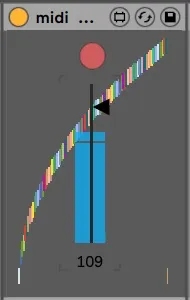
- A visual curve with lot of so beautiful colors allows to scale the response of the fader. Simply click and drag an empty space of the device in the horizontal way to change the curve of the fader.
I use it a lot..
I hope it can be useful for someone else
Best regards
Julien
Comments (2)
..the stock midi device "velocity" does already the same with, of course, more functionnality.
I should have look more carefully =)