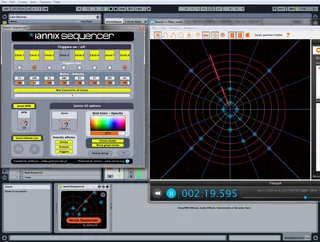
Iannix Sequencer
This MaxForLive device has the purpose to to be used as an i...
- Type
- MIDI Effect
- Author
- softcore
- Version
- 1.42
- License
- Attribution
- Live version
- 8.2.2
- Max version
- 5.1.8
- Downloads
- 5
- Updated
- 2019-09-12
Iannix Sequencer is a MIDI Effect for Ableton Live by softcore, distributed as Creative Commons Attribution. It targets Live 8.2.2 and Max 5.1.8. On maxforlive.com it has 5 downloads. First published 2011-07-03, last updated 2019-09-12. 3 user comments below.
New to Max for Live? Read what MIDI Effects do, what the Attribution license means, how to install a device.
Description
This MaxForLive device has the purpose to to be used as an interface to connect Iannix (www.iannix.org) with Ableton Live and transform Iannix into a "Cyclic Step Sequencer" with 8 available notes - sample slots. Obviously, there are many step sequencers available for Live already, but this one focuses on the visual aspect, providing perhaps a means to the electronic musician to present in his/her gigs a visual "show" to his/her audience. Even though this device can be used with a mouse and a keyboard, it is mainly designed to be used with a midi controller.
Features
- Sync Iannix to Live (limited BPM options due to Iannix limitations)
- Visual feedback of activated - deactivated circles
- Option of visual feedback of velocity on circles, cursors and triggers.
- Various options to customise Iannix looks (circles hidden - shown, grid color - opacity)
- Send each circle to a different midi channel or send all circles to one common midi channel
How to set up
Save the downloaded "IannixSequencer.amxd" file to your "Max Midi Effect" presets inside Live's Library.
Save the contents of downloaded "Examples" folder inside the folder "Examples" of Iannix installation folder (for ease of use, you can just drop the downloaded "Examples" folder inside Iannix installation folder and agree to merge content when asked).
More info and "how to set up" instructions inside the device
Youtube demo video:
http://www.youtube.com/watch?v=e0vyVzhV5b4
Vimeo demo video:
http://www.vimeo.com/25686727
Comments (3)
In order to delete a trigger, click with your mouse pointer on it to select it - a selected trigger has yellow color, then hit "backspace" (for windows) to delete it. I really don't know the key used in mac, I guess it must be mentioned in Iannix help files.
As far as editing-deleting-moving triggers remotely, its something that would require a lot of additional programming which frankly Im not sure if I could handle.
Some other improvements though are on the making such as "quantize" (since there is no way to "snap" drawn triggers to musical values inside Iannix) and a better handling of note duration and note offs.