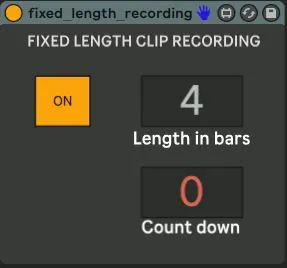
Fixed Length Clip Recording
This device will automatically stop the recording in the ses...
- Type
- Audio Effect
- Author
- JaviHerreroMusic
- Version
- 1.0
- License
- Attribution
- Live version
- 10.1.18
- Max version
- 8.1.5
- Downloads
- 0
- Updated
- 2021-04-20
Fixed Length Clip Recording is an Audio Effect for Ableton Live by JaviHerreroMusic, distributed as Creative Commons Attribution. It targets Live 10.1.18 and Max 8.1.5. Published 2021-04-20. 6 user comments below.
New to Max for Live? Read what Audio Effects do, what the Attribution license means, how to install a device.
Description
This device will automatically stop the recording in the session view after the selected amount of bars. This feature is by default not available in Ableton but it is included in Push.
You can just drop the device in any track and it will work in the whole project while it is on.
It works in any time signature and any tempo aswell.
Comments (6)
Are you using windows or mac?
Do you have any kind of report from Ableton?
does it show on your Max Audio devices folder?
Have you tried to just drag and drop it to Ableton?
Let me know and lets see if we discover the problem :)
The device was working perfectly for the first week or so but then I encountered an error where the device stopped working and a message displayed at the top of the device which said:
"counter: stack overflow --outl..."
That's all the info it gives me, the text seems to truncate after "outl..."
I was able to load a new device and it worked for another week but I just ran into the same error again so it seems to be an error that occurs after a certain number of uses.
I have the device set up in a live set where I have automated the "length in bars" parameter to alternate between 4 and 8 bars depending on what song I am playing in the set. I am doing this by utilitizing a chain selector in ableton.
Let me know if you think you might know how to fix and thanks for your work :)