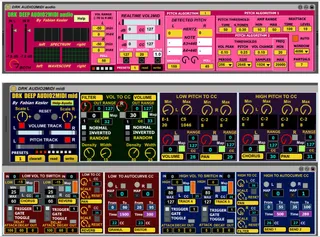
DRK DEEP AUDIO2MIDI
DRK DEEP AUDIO2MIDI (32 and 64 bits versions) converts from ...
- Type
- Audio Effect
- Author
- DrKesler
- Version
- 1.0
- License
- AttributionShareAlike
- Live version
- 9.7.7
- Max version
- 7.3
- Downloads
- 0
- Updated
- 2021-05-17
DRK DEEP AUDIO2MIDI is an Audio Effect for Ableton Live by DrKesler, distributed as Creative Commons Attribution-ShareAlike. It targets Live 9.7.7 and Max 7.3. First published 2021-05-16, last updated 2021-05-17.
New to Max for Live? Read what Audio Effects do, what the AttributionShareAlike license means, how to install a device.
Description
DRK DEEP AUDIO2MIDI (32 and 64 bits versions) converts from volume and pitch from audio signals to MIDI, taking account of different ranges both in pitch and volume, and working with stereo signal independently for each channel.
The project uses 2 devices, one in audio for detection and one for MIDI transform (M4L limitation, but useful in some way to have more organized the functions)
Both in 32 and 64 bits.
I did as I did not find any similar with all the functions I needed, as independent MIDI use of low and high pitches, low and high volumes, and difference from left and right audio material. I used 2 pitch algorithms with all of the parameters: fiddle and fzero, the 2 wich gave me the best results in my experiments. The detection can be mapped to switch, reverse mode, gate, random, dynamic switches, continuous controller, all with free CC, scaling, various algorithms to avoid detection confusions, signal monitors in various types, etc. See video for all details.
It took me a lot of time to experiment and create it, and then to make a video with english subtitles. There are 17 Live projects examples with many of functions and musical possibilities (surely you discover more). Hope you like it and use it both with pre-recorded and alive material. Useful for drums, sax, guitars, human voice and more.
In the ZIP: 32 and 64 bits versions, lots of examples. The .amxd audio and MIDI plugins are on the PRESETS folders. Spanish help and pictures
VIDEO WITH ENGLISH SUBTITLES
https://youtu.be/1FpXIje7cqs
NOTE: FIDDLE object is embedded with the patch, but if for some reason you get a message about it is not present, please download it from my Drive and copy to
RESOURCES-EXTERNALS-MSP
The help file (optional) copy to RESOURCES-HELP
32 BITS
https://drive.google.com/file/d/1QQG6_wmOkpVnhPqfJQd7RQDXXozhj6t3/view?usp=sharing
64 BITS
https://drive.google.com/file/d/17rqtDf6SxbSyg6RvIH7FWO7R-tTE9r9s/view?usp=sharing
Fabian Kesler
https://fabiankesler.blogspot.com