- Type
- Audio Effect
- Author
- byebyeempire
- Version
- 1.0
- License
- Attribution
- Live version
- 11.0.2
- Max version
- 8.1.11
- Downloads
- 800
- Updated
- 2021-05-19
DVD is an Audio Effect for Ableton Live by byebyeempire, distributed as Creative Commons Attribution. It targets Live 11.0.2 and Max 8.1.11. On maxforlive.com it has 800 downloads. Published 2021-05-19. 5 user comments below.
New to Max for Live? Read what Audio Effects do, what the Attribution license means, how to install a device.
Description
All right.
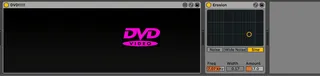
Let's not overthink this: all I did was replicate the bouncing DVD screensaver as a Max for Live device.
Why? Because sometimes when I have an idea — and almost always my DUMBEST ideas — I have to see if it is possible. And if it is, I'm compelled to see it all the way through. I don't know why I am the way that I am; wish I did.
Shout out to my buddy Ian (the artful pedal demo-er Collector//Emitter on YouTube!) for suggesting I turn this into an XY controller (and to Nick for giving this a test drive!). Not that DVD!!!!! needs to be used this way — sometimes sweet things can just exist to be sweet — BUT if you want to map it to stuff here's all you have to do:
Step 1: Click on the bouncing dvd logo. The device will magically expand to the right.
Step 2: There are two map buttons, Map X and Map Y. Click one, then click the parameter in Ableton you want to be controlled by the bouncing dvd logo overlord.
Step 3: The little buttons NEXT to the map buttons? That's how you disengage the mapping.
I've also added a "speed" control. Essentially, this'll give you some rough control over how fast (or not) the logo will bounce around. Revolutionary, I know.
Click the bouncing logo again to make the controls disappear. That's about it!
Let's be clear: I didn't put too much thought into this; there are probably some bugs and whatnot. I apologize. Mostly, this was a chance to try out some features I've never used before (and, you know, get a laugh). If someone finds this at all useful, excellent lmao
Please leave a comment below if you're able to get the logo to bounce exactly in the corner (like in that Office cold open).
Later!
Comments (5)
Also Me: *downloads immediately*
Great effort, seriously put a smile on my face. The only feature I would consider adding would be a trigger output for collision / color change.
Also:
"Let's not overthink this"
yeah right..
"sometimes when I have an idea — and almost always my DUMBEST ideas — I have to see if it is possible."
sounds like a very familiar overthinking process to me xD
welcome to the club rofl