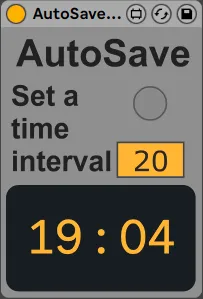
AutoSave
A simple device to save your work in set intervals, super ha...
- Type
- Audio Effect
- Author
- brodiem
- Version
- 1.5
- License
- Commercial
- Live version
- 11
- Max version
- 8
- Downloads
- 0
- Updated
- 2022-02-13
AutoSave is an Audio Effect for Ableton Live by brodiem, distributed as a commercial (paid) device. It targets Live 11 and Max 8. First published 2021-05-24, last updated 2022-02-13. 6 user comments below.
New to Max for Live? Read what Audio Effects do, what the Commercial license means, how to install a device.
Description
A simple device to save your work in set intervals, super handy using unstable plugs or heavy work loads.
Personally i'v lost vst settings which is super frustrating i mostly made this for me but i thought it might be useful.I just put it on my template, combined with Ableton's backup is ultimate.
Toggle the float window with the button below AutoSave.
EDIT - Fixed a bug regarding active window.
EDIT - Updated to Live 11.
Comments (6)
Yeah!
Next Update: Please implement a clean Autosave without the "Save as" Dialogue Window. :)
Thnx for making (my) Live a little bit better ;)
Kind Regards,
Tom
The Save As dialog is unavoidable if the project hasnt previously been saved.
I could generate a random set of charaters and make this very quick but it would be horrible for oragnisational purposes.
If this interest you then i could look deeper, mabye just random word combinations?
Thank you