Multi-Looper Visuals and Window
Forked from https://maxforlive.com/library/device/5526/live-...
- Type
- Audio Effect
- Author
- pyamada
- Version
- 1.0
- License
- Attribution
- Live version
- 11.0.5
- Max version
- 8.1.5
- Downloads
- 549
- Updated
- No Updates
Multi-Looper Visuals and Window is an Audio Effect for Ableton Live by pyamada, distributed as Creative Commons Attribution. It targets Live 11.0.5 and Max 8.1.5. On maxforlive.com it has 549 downloads. Published 2021-08-16. 5 user comments below.
New to Max for Live? Read what Audio Effects do, what the Attribution license means, how to install a device.
Description
Forked from https://maxforlive.com/library/device/5526/live-looper-visuals-large-screen-looper-state.
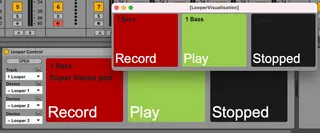
This allows 3 loopers to be visualised both in the device GUI and on a separate window.
Let me know if there's some packaging issue.
Comments (5)
I've tried to document the whole patch on https://yamadapc.medium.com/looping-ableton-and-max-for-live-patching-5cd8d80cdb77, that might be able to help you modify it to suit other needs.
In my projects, the trackID is always displayed like yours, in the tutorial/blog post. "Super freeze pad", etc.
I'm guessing it's got something to do with 'get name' from the Live object, but I can't pin down exactly where it's going wrong.
thanks so much for creating this patch, it's exactly what i'm looking for. would you by any chance be willing to make a 4 looper version? i tried doing it myself but i'm totally lost in max. thank you so much!
kyle