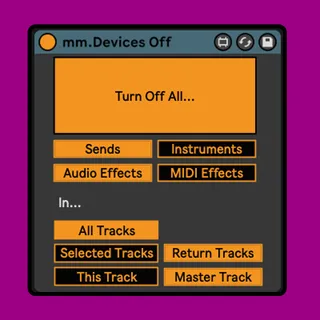
mm.Devices Off - Disable all effects
One mappable button to turn off and on any combination of:...
- Type
- Audio Effect
- Author
- MessinkiMusic
- Version
- 2.0
- License
- Commercial
- Live version
- 10.1.18
- Max version
- 8.1.5
- Downloads
- 0
- Updated
- 2022-05-12
mm.Devices Off - Disable all effects is an Audio Effect for Ableton Live by MessinkiMusic, distributed as a commercial (paid) device. It targets Live 10.1.18 and Max 8.1.5. First published 2021-08-17, last updated 2022-05-12. 16 user comments below.
New to Max for Live? Read what Audio Effects do, what the Commercial license means, how to install a device.
Description
One mappable button to turn off and on any combination of:
audio effects
midi effects
instrument devices
sends
in either:
the selected track(s)
the track the device is placed on
all tracks
UPDATES
11/05/2022 Version 2.0
Completely rewritten and with new features:
Only turns back on devices that were on in the first place.
Works with sends, turning them down to 0, and then back to their original state.
Has option to turn off devices and sends in the selected track(s). Place the device on the master, map it to a key and then quickly toggle devices and sends in the selected track.
11/1/2021 Version 1.2.1
If you have multiple mm.Device Offs in the set, they will not turn eachother off.
Also improved the switching when selecting which tracks you want to turn off effects in.
19/12/2021 Version 1.2.0
Turn On and Off buttons are now mappable
25/09/2021 Version 1.1.0
Added ability to turn off effects on the track that the device is on
20/08/2021 Version 1.0.1
Fixed bug that stopped the device working with MIDI effects
Comments (16)
Now it works as expected. Thank You!
Would be great you had an option to only disable devices of the current selected track.
:-)
2. Also a compare function would come in handy, disable one device while enabling another. Don't know if that's possible with the LOM though.
I was just trying to find the syntax of the message to send live.path for the selected_track sends. I saw this device so it means it's possible, i won't buy your stuff only for this but if you could help me i would appreciate :p !! Thanks
Would it be possible to add a function in which, if 'mm.Devices Off' is on a track, then when the rtrack is simply muted, all of the devices on that track are disabled, and when the track is enabled, all the devices are enable again? This would be very powerful and fast for large orchestral templates!
I bought the device thinking that I could globally disable all sends in Ableton. However, rather than disabling sends, it just sets their values to -inf. Is there a way to get the device to disable sends instead?
Cheers,
Tom