- Type
- Audio Effect
- Author
- elliotEtag
- Version
- 1.0
- License
- None
- Live version
- 11
- Max version
- 8
- Downloads
- 376
- Updated
- 2021-09-30
DFAM Reset is an Audio Effect for Ableton Live by elliotEtag, distributed as freeware, with no license specified by the author. It targets Live 11 and Max 8. On maxforlive.com it has 376 downloads. First published 2021-09-29, last updated 2021-09-30. 4 user comments below.
New to Max for Live? Read what Audio Effects do, how device licenses work, how to install a device.
Description
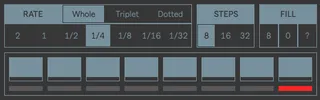
Connect the output of the M4L device to the "ADV / CLOCK" gate input of the DFAM.
Manually set the DFAM sequencer to the step 8 (once at the start of the session).
The device will automatically advance the DFAM sequencer till it reaches the step 8 when Ableton Live transport stops.
Comments (4)