a better search for max devices
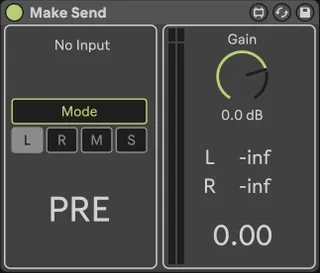
Make Send screenshot

Make Send

by all4live

This device will allow you to create a send channel from a r...

View on maxforlive.com Website

Type
Audio Effect
Author
all4live
Version
1.2
License
Commercial
Live version
10.1.7
Max version
8.1.5
Downloads
0
Updated
2021-12-10

Description

This device will allow you to create a send channel from a regular track ....

The "solo" mode is supported ....

warning : Do not use tracks with the same name in the project the solo mode may not work correctly !! ....

up : add "MS" mode ....

up 10.12.2021 :

1: redesign ...

2: added left and right channel modes ....

3: mode switched to ~gen ....

4: added support for group tracks for auto solo ....

Comments (8)

  • yunker · October 06 2021
    It`s gamechagener!!!!!
  • Hoags · October 06 2021
    I cant seem the get all the controls i'm in Live 11. The two drop downs at the top "Audio" and "post mixer" are missing???
  • all4live · October 06 2021
    Hoags, check your email and download the device again, - error fixed ....
  • WHZLY · October 22 2021
    Do you mind explaining why you wanted to make something like this? I think this is really cool but I am definitely not understanding the concept. Is this not the same as just setting the second "audio" track in your demo video to "IN" and have the input come from the first track? I think im missing what this the device does or can do.
  • all4live · October 23 2021
    WHZLY, if you press solo on the track from which the signal is leaving, then in the usual version the receiving track will not be in solo, this device will solo the track on which it is located, that is, the track on which the signal comes, as well as the default Live send ... yes, there are small bugs, but they will be fixed in the update ....
    + lo pass and hi pass filters will be added, as well as the ability to separately receive the left and right channels of your choice ... well, and some more improvements ....
  • peckoon · October 26 2021
    Unlike the pictures I saw before purchase, there are only MS buttons and no M buttons and S buttons. They only come out when I press the MS button. S is a useless feature that allows you to only listen to tracks that send audio signals. (It's just a function that you can do on a track.) Press M and nothing changes. I like this device. However, I hope there will be a button to listen only to the sound of the track with the MAKE SEND.
  • all4live · October 29 2021
    peckoon, "ms" is to switch mid and side track contents, means you just have a mono signal ....
  • peckoon · October 30 2021
    Then, how can I listen to the track with 'Make Send' as a solo?

← Back to search