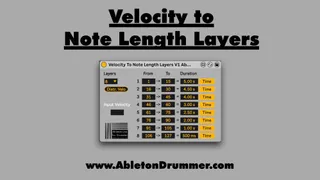
Velocity to Note Length Layers
This devices is part of the "Velocity Pack" which consists...
- Type
- MIDI Effect
- Author
- AbletonKurse
- Version
- 1.0
- License
- Commercial
- Live version
- 10.1.18
- Max version
- 8.1.5
- Downloads
- 0
- Updated
- 2021-11-04
Velocity to Note Length Layers is a MIDI Effect for Ableton Live by AbletonKurse, distributed as a commercial (paid) device. It targets Live 10.1.18 and Max 8.1.5. Published 2021-11-04.
New to Max for Live? Read what MIDI Effects do, what the Commercial license means, how to install a device.
Description
This devices is part of the "Velocity Pack" which consists of 7 devices - check it out here: https://blog.abletondrummer.com/velocity-devices-pack---max-for-live-pack/
Velocity to Note Length Layers
This device lets you set a different duration for MIDI notes depending on its playing velocity. You can create up to 8 different rows/layers for ranges of velocity and define those individually. After you selected the number of rows/layers you could click on “Distr. Velo” to distribute the velocity ranges equally over the selected number of rows/layers. You can as well edit the ranges to your individual needs BUT you don’t want to create overlapping ranges as this will result in multiple conflicting notes of the same pitch will be created.
The duration values can be set in time values or in note values which will be relative to the set master tempo.
More info: https://blog.abletondrummer.com/velocity-devices-pack---max-for-live-pack/