SPD-SX Buttons to Chain Selector
SPD-SX Buttons to Chain Selector This Max for Live de...
- Type
- MIDI Effect
- Author
- AbletonKurse
- Version
- 1.0
- License
- Commercial
- Live version
- 10.1.18
- Max version
- 8.1.5
- Downloads
- 0
- Updated
- 2022-05-26
SPD-SX Buttons to Chain Selector is a MIDI Effect for Ableton Live by AbletonKurse, distributed as a commercial (paid) device. It targets Live 10.1.18 and Max 8.1.5. First published 2021-11-04, last updated 2022-05-26.
New to Max for Live? Read what MIDI Effects do, what the Commercial license means, how to install a device.
Description
SPD-SX Buttons to Chain Selector
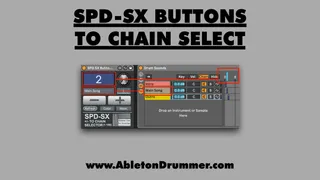
This Max for Live device connects the Kit Change (SPD-SX) and Chain Selector concepts and helps you to control and monitor sound/kit changes.
The +/- buttons of the SPD-SX can access the chain selector and the name and color of the connected chains. Other MIDI controllers and automations can be used to reflect and show the current selected sounds.
You will find more info, a manual and a video here:
https://blog.abletondrummer.com/spd-sx-with-ableton-live
----------------------------------
Check out more Max for Live devices here:
https://maxforlivedevices.com/
All Devices - https://maxforlivedevices.com/category/all-devices/
Collections - https://maxforlivedevices.com/category/collections/
Control - https://maxforlivedevices.com/category/control/
Free - https://maxforlivedevices.com/category/free-max-for-live/
Hardware - https://maxforlivedevices.com/category/hardware-control/
How To and FAQ - https://maxforlivedevices.com/category/faq/
MIDI Tools - https://maxforlivedevices.com/category/midi-tools/
Max for Live not only for drummers:
https://blog.abletondrummer.com/free-max-for-live-devices/
How to install Max for Live devices:
https://blog.abletondrummer.com/how-to-install-max-for-live-devices-in-your-user-library/
List of best Max for Live for live music performance in 2022:
https://maxforlivedevices.com/best-max-for-live-devices-in-2022/
How to get Max for Live devices:
https://maxforlivedevices.com/how-to-get-max-for-live-devices/
Frequently Asked Question and How To Max for Live:
https://maxforlivedevices.com/category/faq/