- Type
- Audio Effect
- Author
- jamesholden
- Version
- 1.2
- License
- None
- Live version
- 10.1.18
- Max version
- 8.1.5
- Downloads
- 179
- Updated
- 2022-01-01
console pal is an Audio Effect for Ableton Live by jamesholden, distributed as freeware, with no license specified by the author. It targets Live 10.1.18 and Max 8.1.5. On maxforlive.com it has 179 downloads. First published 2021-12-14, last updated 2022-01-01. 2 user comments below.
New to Max for Live? Read what Audio Effects do, how device licenses work, how to install a device.
Description
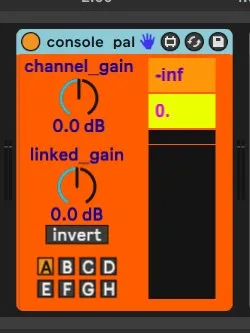
i made this very simple device to use with airwindows console but it's useful any time you want to experiment with drive amount into a plugin or piece of hardware.
all it is is a gain control. the 'linked gain' knob is linked to the 'linked gain' knob on other instances of the plugin, and if invert is active the linked ones are inverted from this one. that's it.
example usage:
console pal ---- plugin ---- console pal
(set to group A) (set to group A, invert)
then when you turn up the linked gain on the first one the second one turns it down an equal amount, so you can find the tonal sweet spot of the plugin without having to juggle the output gain
with airwindows console you'd use these just before the consoleNchannel plugin (the peak meter is useful here) and then again after the buss plugin set to invert. if you have submixes the group buttons allow you to use it on multiple different sets of channels.
v1.1 now tells you if something on that group has clipped
v1.2 tries to autolookup values when you switch groups etc, also allows automating linked gain dial. finally: because clipping only matters on the way into channel plugins (or ext fx, or whatever), engaging the link invert switch stops clips being reported.
known issue - for some reason (not sure why yet) this plugin meant i could only get a render that sounded like what i heard in playback by doing 'resampling' into a channel - the render function confuses these plugins?
Comments (2)
Here is a way to update it in a way of having an "automatic"switch when we are changing between groups on the Master. For example when I want to change the gain on grp B and I 'm on Grp A I need to click on Grp B on the 2nd Console Pal to 'listen' the changes . hope its enough clear ^^
Regards