- Type
- Audio Effect
- Author
- Slynk
- Version
- 1.0
- License
- AttributionShareAlike
- Live version
- 11.0.12
- Max version
- 8.1.11
- Downloads
- 0
- Updated
- 2021-12-17
Duck Call is an Audio Effect for Ableton Live by Slynk, distributed as Creative Commons Attribution-ShareAlike. It targets Live 11.0.12 and Max 8.1.11. Published 2021-12-17.
New to Max for Live? Read what Audio Effects do, what the AttributionShareAlike license means, how to install a device.
Description
Video Tutorial: Coming soon.
==========================
YOU MUST HAVE MAXFORLIVE TO USE THIS DEVICE.
THIS DEVICE ONLY WORKS IN ABLETON LIVE 11 SUITE or STANDARD. IF YOU HAVE LIVE 11 STANDARD - MAXFORLIVE MUST BE PURCHASED SEPARATELY.
THIS DEVICE DOES NOT WORK IN LIVE 10.
THIS IS NOT A VST. THIS WILL NOT WORK IN OTHER DAWS SUCH AS FL STUDIO.
=============================
What Is Duck Call?
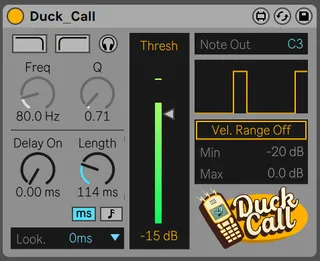
Not everyone uses MIDI notes to trigger their drums, and if you're doing your drums in audio it can be a pain to setup sidechain compression with devices that accept MIDI triggers, such as Duck Buddy. Drop a Duck Call on your audio channel and set the threshold. When the audio level goes above the threshold, a MIDI note is broadcasted.
It's that simple. There is a few other features like filters to narrow in on your transient, and lookahead.
Created by Jarlyk.
Slynk helped a little with the GUI, logo design and beta testing.
Join us on Discord: https://discord.gg/ZGMepNk
============================
Compatibility
Ableton Live 11.0.1+
Max For Live 8.1.9+
This is not a VST. This will not work in any other DAW besides Ableton 11. You must have MaxForLive to use this device.