- Type
- Instrument
- Author
- pelinayy
- Version
- 1.0
- License
- None
- Live version
- 11.0.12
- Max version
- 8.1.11
- Downloads
- 402
- Updated
- No Updates
Peldom is an Instrument for Ableton Live by pelinayy, distributed as freeware, with no license specified by the author. It targets Live 11.0.12 and Max 8.1.11. On maxforlive.com it has 402 downloads. Published 2022-01-05.
New to Max for Live? Read what Instruments do, how device licenses work, how to install a device.
Description
Granulator Synthesizer with Backwards Option
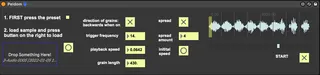
For smooth functioning, press the Preset button first, load the sample it the drop box, and press the button right next to the drop box.
Once loaded, you can manipulate the following:
- direction of grains: if the grain should be played forward or backward
- trigger frequency per second
- playback speed (of the whole sample)
- grain length
- spread option: on or off; jitter in the grain selection when on
- the amount of spread
- initial speed button: to go back to the playback speed when loaded
- START button
NOTE: There is one important bug. After the playback reached the end of the sample, there is a short, fast, playback of the beginning of the sample. That is why we recommend to use a sample with silence before and after to minimize/eliminate this unwanted effect.