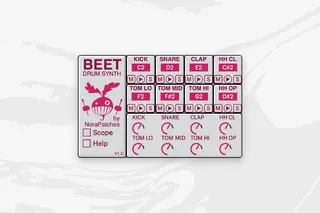
BEET - drum synthesiser
BEET drum synthesiser format: Max Instrument Device...
- Type
- Instrument
- Author
- NoraPatches
- Version
- 1.0
- License
- Commercial
- Live version
- 10.1
- Max version
- 8.2.1
- Downloads
- 1
- Updated
- 2022-01-20
BEET - drum synthesiser is an Instrument for Ableton Live by NoraPatches, distributed as a commercial (paid) device. It targets Live 10.1 and Max 8.2.1. On maxforlive.com it has 1 downloads. First published 2022-01-17, last updated 2022-01-20. 3 user comments below.
New to Max for Live? Read what Instruments do, what the Commercial license means, how to install a device.
Description
BEET
drum synthesiser
format: Max Instrument Device
Get the device 50% OFF with the discount code "beetlaunch" for a limited time only!*
https://www.youtube.com/watch?v=oynaKacjvV4
BEET is a Drum Synth with 8 engines designed to synthesise percussive sounds. Below you can find the elements of each engine.
All UI elements are automation-enabled and MIDI mappable.
The Main Output is a stereo mix of all 8 engines, that you can level with a Volume dial for each engine. You can also use the external outputs (in pairs) to route the audio signals for each engine separately.
There is a built-in multimode Scope to see your synthesised signals (per engine) and a Help window that explains general functionality and audio routing.
To see the UI for a given engine, click on the name of the slot. To shrink the device, click the arrow button on the right hand side. You can Mute or Solo an engine with the corresponding M and S buttons.
Trigger an engine by clicking the Play Trigger buttons or routing MDI notes. Set the MIDI notes in the number boxes under the Slot names.
Every parameter has an InfoView description that you can see by hovering over with the cursor.
KICK
Sine Wave Oscillator
Noise Oscillator
Amplitude Envelope
Pitch Envelope
Multi-Drive Unit
SNARE
Sine Wave Oscillator
Noise Oscillator
2nd Noise Oscillator
Amplitude Envelope
Pitch Envelope
Subtle Drive Unit
CLAP
Noise Oscillator
Amplitude Envelope
Resonant Filter Unit
Heavy Drive Unit
HIHATS
Noise Oscillator
Amplitude Envelope
Velocity
Panorama
High-Pass Filter
TOMS
Sine Wave Oscillator
Noise Oscillator
Amplitude Envelope
Pitch Envelope
Panorama
*voucher valid until 1st Feb 2022
2022 © NoraPatches
Comments (3)
I am happy to share the drum rack, let me know, if you want it.