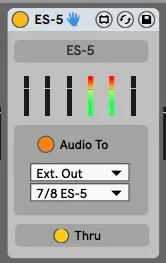
Expert Sleepers ES-5 encoder device
This is an encoder the the Expert Sleepers ES-5 device using...
- Type
- Audio Effect
- Author
- mrkarlos
- Version
- 0.1
- License
- Attribution
- Live version
- 11.0.12
- Max version
- 8.2.1
- Downloads
- 235
- Updated
- No Updates
Expert Sleepers ES-5 encoder device is an Audio Effect for Ableton Live by mrkarlos, distributed as Creative Commons Attribution. It targets Live 11.0.12 and Max 8.2.1. On maxforlive.com it has 235 downloads. Published 2022-02-02. 1 user comment below.
New to Max for Live? Read what Audio Effects do, what the Attribution license means, how to install a device.
Description
This is an encoder the the Expert Sleepers ES-5 device using a gen~ native ES-5 encoder.
This device uses the left input of each stereo pair as input.
ES-5 port 1 = 3/4 (this is a Gate device)
ES-5 port 2 = 5/6
ES-5 port 3 = 7/8
ES-5 port 4 = 9/10
ES-5 port 5 = 11/12
ES-5 port 6 = 13/14
I recommend that you drop this on an empty audio track, rename the track to ES-5. Set 'Audio From' to "No input' and set 'Audio To' to 'Sends Only. On the Max for Live device choose the stereo pair that is connected to your ES-5. The 'Audio To' button can be used to mute the audio going to your ES-5.
Note, channel 1 and 2 are not used by the device and by default the signal is passed thru without any modification. If you don't want to forward the signal you can turn of 'Thru'.
Please check my ESX-8CV and ESX-8GT devices
Comments (1)