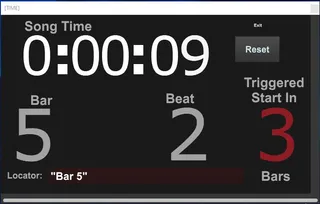
Live Performance Timer and Helper
This live performance utility has the following functions:...
- Type
- MIDI Effect
- Author
- jeffbvox
- Version
- 1.0
- License
- None
- Live version
- 10.1.18
- Max version
- 8.1.5
- Downloads
- 980
- Updated
- 2022-02-11
Live Performance Timer and Helper is a MIDI Effect for Ableton Live by jeffbvox, distributed as freeware, with no license specified by the author. It targets Live 10.1.18 and Max 8.1.5. On maxforlive.com it has 980 downloads. Published 2022-02-11. 3 user comments below.
New to Max for Live? Read what MIDI Effects do, how device licenses work, how to install a device.
Description
This live performance utility has the following functions:
-it will give you a large display with the amount of time since play has started
-displays which bar and beat you're currently on
-display of Locator text from arrangement view at the time it was hit
-displays how many bars you have until the next global quantization interval is reached which is helpful for knowing when a triggered clip will play/record
Originally developed by MaxForCats, (https://maxforlive.com/library/device/3108/timer), with the following updates:
-updated the popup version to be a little larger for better on screan readability
-aligned and styled the text to be consistent
-removed BPM display
-added "Triggered Start In" countdown to let you know how many bars away the next globally quantized clip will begin playing/recording (super helpful for live performance.
-added reset button to take you back to Bar 1 Beat 1
-added Song Time label
-lengthened the Locator display. This will display the arrangement view locator text if you want to give a message to yourself at a certain spot in a song.
Comments (3)
However, I noticed that the timestamp changes during a BPM/tempo change and it shows the wrong time (which would be correct only if the track was entirely made with that tempo). I know that coding and programming are usually a "pain in the ass", and I probably could fix it if I were more skilled in Max/MSP, but I'm a newbie and don't want to touch things that I can surely break because of lack of knowledge. I also can't learn all the stuff behind this timer in a day and have to study for university.
By the way, I would love to hear good news about this device when somebody finally fixes it and tells me the reason of this problem and the way it got repaired.
Best regards :)